Field notes
TrailForge: Building a Storefront I Could Cache, Attack, and Measure
TrailForge: Building a Storefront I Could Cache, Attack, and Measure
Most demo websites are built to be looked at. I built TrailForge to be tested.
TrailForge Commerce is a fictional outdoor-equipment store I originally created for a Cloudflare App Services customer roleplay. The scenario was familiar: a growing e-commerce company cared about performance because performance affected revenue, but it was also dealing with application-layer attacks, automated abuse, fraudulent logins, and checkout abuse. I did not want to walk into that conversation with only slides and a dashboard tour of an idle website. I wanted a real site, running on a real origin server, that I could cache, attack, watch, and measure while I explained what was happening.
That presentation never happened, but the project did not disappear. The code stayed on my DigitalOcean droplet, disabled but intact. On October 30, 2026, I brought it back under a new home: trailforge.nasimlab.com.
This article explains why I built it the way I did, how the request path works, what the caching and security controls actually do, what I verified, and where the current Free-plan version is more limited than the Enterprise-zone design I originally planned. I would rather explain those limits clearly than make the project sound bigger than it is.
At a glance
- Problem: A normal demo can describe caching and application security, but it cannot prove either one. I needed a working property where the effects were visible.
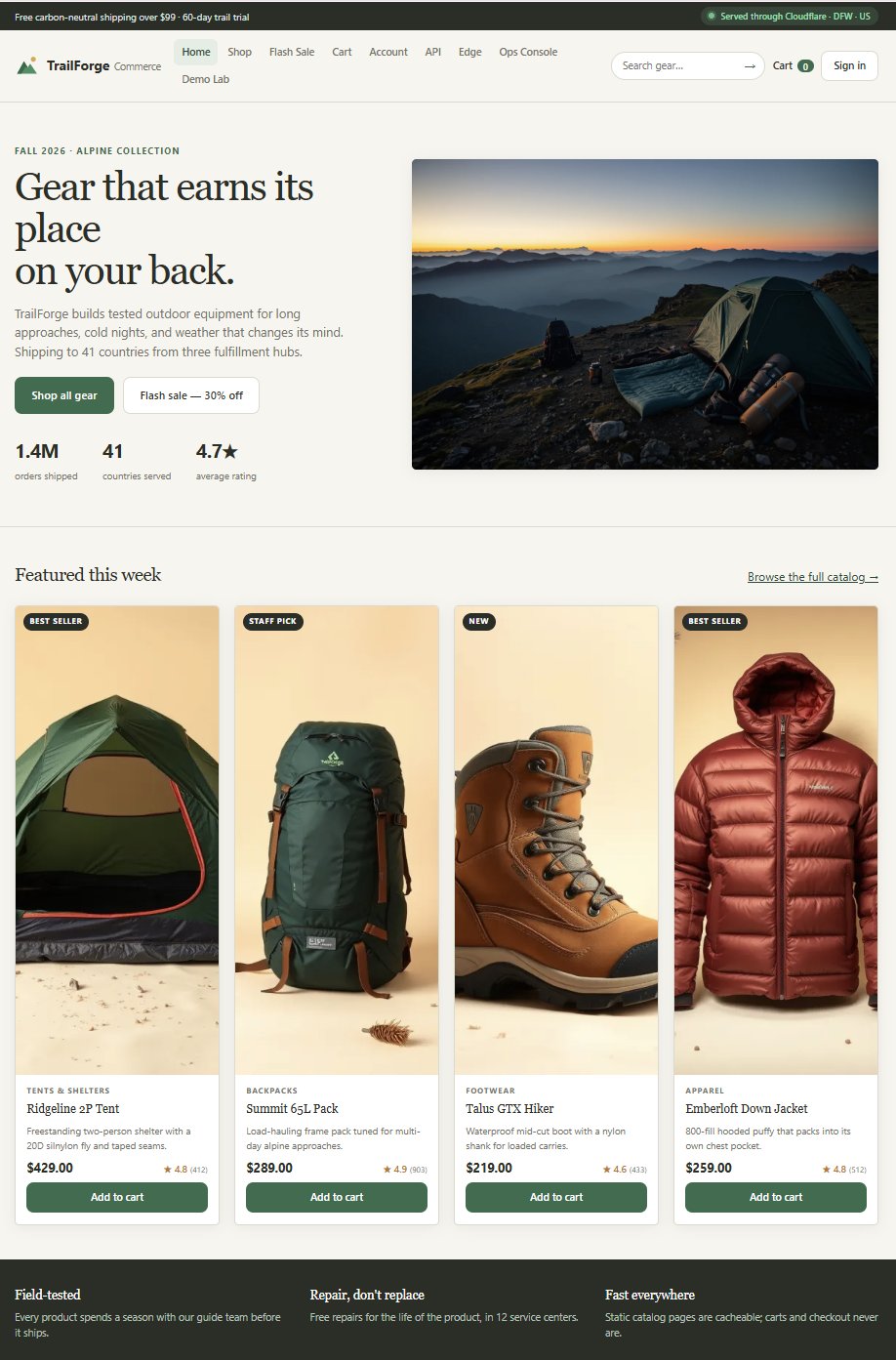
- What I built: A complete fictional storefront with 16 products, eight categories, search, filtering, sorting, a flash-sale page, cart, checkout, account pages, and a small JSON API.
- The important part: I added three diagnostic surfaces —
/edge,/ops, and/lab— so I could inspect what reached the origin, count origin work, and generate controlled test traffic against my own hostname. - Infrastructure: One DigitalOcean droplet in New York running Ubuntu, Nginx, and a zero-dependency Node.js application behind a systemd service.
- Delivery and security: Cloudflare provides DNS, proxying, TLS, cache rules, a managed ruleset, custom WAF rules, and login rate limiting.
- Verified result: Public catalog pages and static assets return
cf-cache-status: HITafter they are warmed; private pages stayDYNAMIC; test SQL injection and XSS payloads and the/adminpath return403; a 25-request credential-stuffing test received five401responses and then flipped to429when the login rate limit took over; the origin console separately counts proxied and direct requests. - Limitations: This is a demonstration system on one small server. It is not a production store, it has no real customers or payments, and the Cloudflare Free plan does not provide the same generic managed WAF signatures, bot-score data, or cache-key controls that were available in the original Enterprise-zone design.
- Cost: The droplet costs $6 per month and is shared with my other NasimLab sites. Cloudflare Free adds no cost.
Why I did not use slides or a mock storefront
A dashboard tour has a basic problem: if nothing is happening, there is nothing to see.
Cache analytics are flat. Security Events are empty. A rule exists, but there is no traffic for it to act on. You can still explain the concepts, but the audience has to take your word for the result.
I wanted the evidence on the screen.
If I said Cloudflare was reducing origin load, I wanted a counter that only moved when a request actually reached my server. If I said a product page was cached, I wanted to reload it and show that the origin timestamp did not change. If I said a login endpoint needed rate limiting, I wanted to generate the burst and watch the response pattern change.
That changed the whole design. TrailForge stopped being “a website with a few security settings attached” and became a measuring instrument that happened to look like a store.
What TrailForge includes
The storefront itself had to feel complete enough for the caching and security decisions to make sense. It includes:
- A home page and a flash-sale page
- A shop with category filters and price/rating sorting
- Sixteen products across tents, packs, sleep systems, footwear, apparel, electronics, camp kitchen, and climbing
- Product pages with a separate live-inventory request
- Search
- Cart and checkout flows
- Login and account pages
- A public API page with working endpoint tests
The API exposes the pieces a mobile app or retail partner might use: the catalog, categories, individual products, inventory, search, cart operations, login, checkout, orders, health, and the statistics used by the operations console.
The three pages that matter most to the project are not shopping pages:
| Page | What it is for |
|---|---|
/edge | Shows the headers the origin received, runs a cache probe, and compares the proxied hostname with the direct origin hostname. |
/ops | Shows live counters for requests that actually reached the origin, split between the Cloudflare door and the direct door. It also shows recent login attempts. |
/lab | Fires controlled test traffic at TrailForge itself: credential stuffing, checkout abuse, SQL injection probes, XSS probes, catalog scraping, and cache warm-up. |
Those pages are the reason the project still interests me. Plenty of people can say “the CDN improves performance” or “the WAF blocks attacks.” TrailForge gives me a way to show the mechanism and the result in the same place.
The architecture
TrailForge has two public hostnames, and they both lead to the same origin application:
trailforge.nasimlab.comis proxied through Cloudflare.origin-trailforge.nasimlab.comis DNS-only, often called grey-cloud, and reaches the same server directly.
That one decision makes an honest comparison possible. The application, content, server, and network destination stay the same. The main variable is whether Cloudflare is in the request path.
flowchart LR
    V[Visitor] -->|trailforge.nasimlab.com| C[Cloudflare edge]
    C -->|HTTPS, Full strict| N[Nginx on the droplet]
    V -->|origin-trailforge.nasimlab.com| N
    N --> A[Node.js app on 127.0.0.1:3100]
    A --> S[Catalog, sessions, API, and request counters]
On the droplet, Nginx terminates the public HTTPS connection and reverse-proxies the request to the Node application. The Node process listens only on 127.0.0.1:3100; it is not exposed directly as another public application port. A systemd unit runs it as a service so it starts with the machine and can be managed like any other Linux service.
The application itself uses only Node’s built-in modules. There is no Express install, no node_modules directory to synchronize, and no build step that can fail because a package changed overnight. That was not an anti-framework statement. It was a reliability choice for a demo I needed to restart quickly and understand completely. If something broke, I wanted the shortest possible path between the request and the code handling it.
Why I used a real origin instead of serving everything from the edge
A serverless or edge-rendered version would have been easier to deploy, but it would have weakened the lesson.
I needed an origin I could protect, overload, observe, and gradually unload. I needed normal cache behavior in front of a normal origin response: a first request that fills the cache, later requests that may be answered at the edge, and private responses that must never be shared. I also needed a server whose request counter could settle the argument when someone asked whether the cache was actually doing anything.
The droplet gave me that control.
Why every request goes through the Node process
Nginx could serve the CSS, JavaScript, and images directly, and in a pure performance exercise that might be the better choice. I deliberately sent application and asset requests through the same Node process because TrailForge’s counters had to be trustworthy.
If Nginx served most assets itself, the origin console would miss most of the traffic. The offload numbers would look better or worse for the wrong reason. I accepted a less-than-maximally-optimized origin so the measurement would mean something.
That is a trade-off I still like: for this project, correct measurement was worth more than squeezing the last few milliseconds out of the origin.
Making the real visitor visible behind the proxy
When a request passes through a reverse proxy, the application can easily end up seeing the proxy’s address instead of the visitor’s. That makes login records and abuse analysis much less useful.
Nginx is configured to trust Cloudflare’s published IP ranges and use CF-Connecting-IP as the real client address. As a result, the origin can record the actual visitor address, country, and Cloudflare ray ID instead of treating every proxied request as if it came from Cloudflare itself.
The /edge page makes this visible. It shows what the origin received — host, ray ID, country, connecting IP, visitor scheme, cookies, and whether bot-score headers are present. On the Free plan, the bot-score fields are normally absent, and the page honestly shows that instead of inventing a score.
Caching was a correctness problem before it was a speed problem
People often talk about caching as if the goal is to cache as much as possible. It is not. The goal is to cache the right responses, for the right amount of time, while making sure personalized or changing data never leaks into a shared copy.
TrailForge’s origin sends different cache instructions for different kinds of content:
| Content | Origin Cache-Control | Why |
|---|---|---|
| Product images | public, max-age=31536000, immutable | The artwork is stable, and each file is tied to a specific product SKU. A year is reasonable, and immutable avoids pointless revalidation. |
| Other static assets | public, max-age=604800 | CSS and JavaScript can stay in a browser cache for a week, but they are not treated as permanent in the same way as the artwork. |
| Catalog pages | public, max-age=60, s-maxage=300, stale-while-revalidate=60 | A browser keeps a page briefly; a shared cache may keep it for five minutes. If a refresh is needed, a stale copy can be served while the new one is fetched. |
| Product and category APIs | public, max-age=30, s-maxage=120 plus stale-while-revalidate | Catalog data is not personal. Treating every API as uncacheable gives up useful origin offload. |
| Cart, checkout, account, login, diagnostics, and most other APIs | private, no-store | These responses are personal, authenticated, live, or operational. They should not be stored in a shared cache. |
| 404 responses | no-store | A missing page today may exist tomorrow. I did not want an early mistake preserved by the cache. |
The distinction between max-age and s-maxage matters. The first controls a private browser cache. The second is for shared caches such as a CDN. A catalog page can therefore be short-lived in the visitor’s browser while remaining useful at the edge for longer.
The product page contains my favorite example. The page itself is cacheable because the product name, description, price display, and artwork do not change from visitor to visitor. But the live inventory call is separate and sends no-store. That means the shared page can be fast without pretending that stock is frozen. Cache the page; do not cache the number that tells someone whether the last tent is still available.
The footer gives the game away
Every page prints three origin values in its footer: when the origin rendered it, a request sequence number, and how long the render took.
On a private page, those numbers change on every reload because the origin is doing the work again. On a cached page, they stop moving. Reload it five times and the same rendered copy comes back.
That simple detail turned out to be one of the clearest explanations in the whole project. I do not have to ask someone to trust a header or open DevTools. The page itself shows whether the origin was involved.
The Cloudflare cache rules on NasimLab
Cloudflare sits in front of the origin, so the origin headers are only one side of the policy. For the revived site, I applied three cache rules scoped only to the TrailForge hostname. They do not change the behavior of my blog or the other sites in the same Cloudflare zone.
1. Bypass private and session-based pages
The first rule bypasses the cache for:
/cart/checkout/account/login/ops/edge/lab- Any request carrying a
tf_sessioncookie
The cookie condition is the part I care about most. A list of private paths is useful, but it is brittle. Add a new authenticated page next month and someone has to remember to add it to the list. Keying the bypass on the session cookie is a safer default: if the request belongs to a signed-in session, it does not belong in a shared cache.
2. Keep static assets at the edge for 30 days
The second rule makes /assets/ content and common static file extensions eligible for caching and overrides the edge time-to-live to 30 days. The browser still follows the origin’s browser-cache instructions.
That separation is intentional. Edge copies are close to visitors and can be purged centrally if I need to replace something. A copy already sitting in thousands of browsers is much harder to take back, so I am more conservative there.
3. Cache the public catalog for five minutes
The third rule covers the home page, shop, product pages, the flash-sale page, search, catalog-style filtered URLs, and the product and category APIs. It sets a five-minute edge TTL.
Five minutes is a practical demonstration value. It is long enough to create obvious offload, but short enough that a price or catalog correction does not linger all day. In a larger store, I would separate the lifetimes more carefully: the product template, catalog data, sale page, and search results do not all change at the same rate.
The rule also carries its own session guard: it refuses to match any request with a tf_session cookie. That turns out to matter more than it looks — see the rule-ordering problem in the failures table below. The catalog HTML itself contains no personal data (the cart count is filled in by a separate private API call), but the design contract says a session request bypasses the shared cache, and I wanted the behavior to match the contract rather than rely on an argument about why an exception would probably be harmless.
What the Free plan changed
The original Enterprise-zone design also excluded marketing parameters such as utm_source, gclid, and fbclid from the cache key. That matters in real e-commerce. Without it, one product page can become dozens of separate cache entries because every advertising click arrives with a different tracking string.
Cloudflare’s Free plan is not entitled to that custom cache-key override, so I could not reproduce it on NasimLab. The catalog still caches, but it caches by the full query string, tracking parameters and all.
That is exactly the sort of limitation I want documented. “It works” is less useful than “this part works, this part is plan-limited, and this is the behavior that follows from that.”
Measuring origin offload instead of claiming it
The /ops page is the part I would keep if I had to remove half the project.
It polls the application every two seconds and displays only the requests that reached the origin. Cached responses are invisible to it for the right reason: the origin never saw them.
The counters are split into two “doors”:
- Cloudflare: requests that arrived through the proxied hostname
- Direct: requests that arrived through the grey-cloud hostname
During the original build’s verification, 30 catalog page loads through Cloudflare produced zero origin HTML requests. That number explains origin offload better than a percentage on a slide. The edge was answering, so the origin had nothing to do.
When I revived the site, I ran a smaller sanity check against the counters. One request through the proxied hostname moved the Cloudflare counter from 435 to 436. One request through the direct hostname moved the direct counter from 398 to 399. Small numbers, but they prove the split is real and that the two doors are being counted independently.
A cache hit also depends on where the visitor is connected. Cloudflare does not maintain one global copy that every location instantly shares in the same way. A page may be a MISS at one point of presence while it is already a HIT somewhere else. That is another reason I prefer repeated checks and origin counters over taking one response header as the whole story.
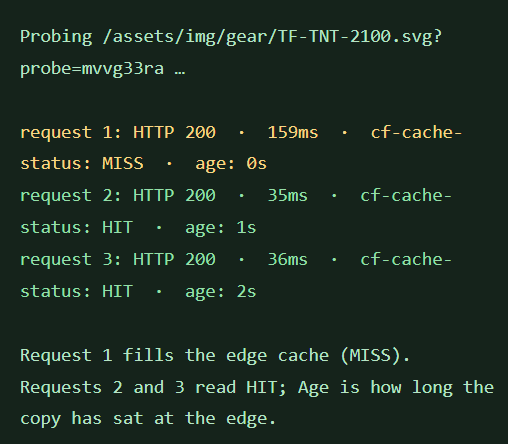
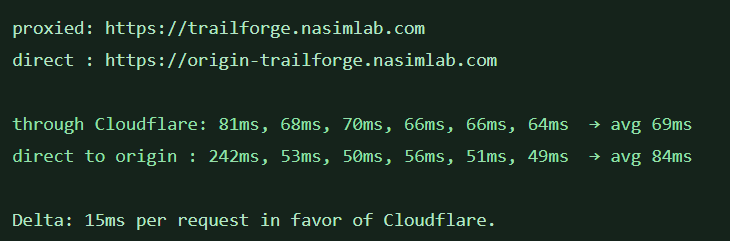
The probe screenshots above are from my own browser run, and I read them the same careful way. The cache probe is the clean result: the first fetch took 159 ms and reported MISS; the second and third came back in 35–36 ms as HITs. That is the edge doing exactly one job — answering from a copy it already held instead of asking New York again. The proxied-versus-direct comparison is more modest: 69 ms average through Cloudflare against 84 ms direct, and the direct average is pulled up by a 242 ms first request, after which the direct requests were actually a little quicker than the proxied ones. I am keeping that result in the article on purpose. Fifteen milliseconds on one run, from one network, is a data point — not a law of physics — and the honest claim is the cache behavior, not a universal speed promise.
The security design: different endpoints deserve different answers
The dangerous mistake in application security is treating every request as if it deserves the same response.
A normal shopper mistyping a password, a credential-stuffing script trying thousands of passwords, a customer completing checkout, and a scanner probing an administrative path are four different situations. Blocking all of them in the same way would be simple, but it would not be good security.
TrailForge’s lab lets me generate several of those patterns against my own site:
- 25 rapid login attempts for credential stuffing
- 15 rapid checkout submissions for card-testing-style abuse
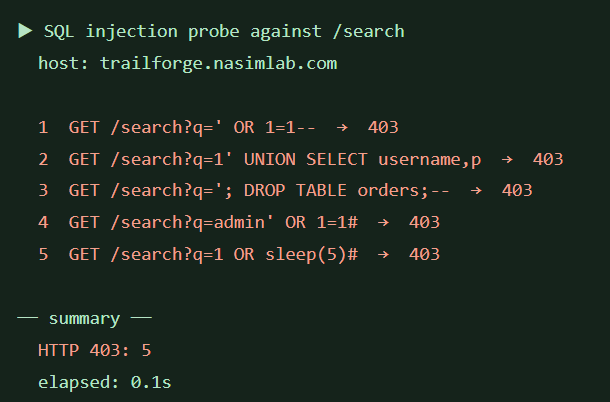
- SQL injection payloads against search
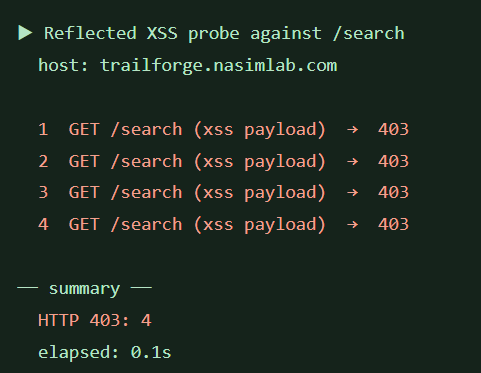
- Reflected XSS payloads against search
- 40 catalog API reads to simulate scraping
- Repeated catalog requests to warm the cache and report a hit ratio
The generators are scoped to TrailForge’s own hostname. This is a controlled demonstration surface, not a tool for testing somebody else’s website.
The login rate limit
The Cloudflare Free plan allows one rate-limiting rule, so I had to choose the endpoint that mattered most for the demonstration. I used it on login.
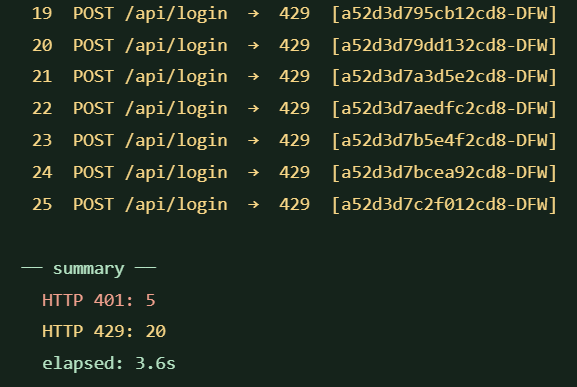
The rule matches POST requests to /api/login or /login and allows five requests in ten seconds from the same IP and Cloudflare location. After that, Cloudflare blocks additional requests for ten seconds.
That is not the same setting as the original design. On the Enterprise plan, I had planned five requests per minute for login and a separate, more forgiving managed challenge for checkout at ten requests per minute. The reasoning was deliberate:
- Login can be blocked more firmly. A human may mistype a password a few times, but a rapid burst is much more likely to be automated.
- Checkout deserves more care. A false positive at checkout can cost a real order, so a challenge is often a better first response than a hard block.
- Counting is distributed. Cloudflare rate limiting is not one global counter sitting on my origin. The IP and location are part of how the count is keyed, which matters when explaining what a determined distributed attack can and cannot do.
The one-rule Free-plan limit forced a choice. I chose credential stuffing because it is easy to demonstrate and because the lab already had a generator for it. Checkout protection remains a documented next step rather than something I am pretending is active in the current configuration.
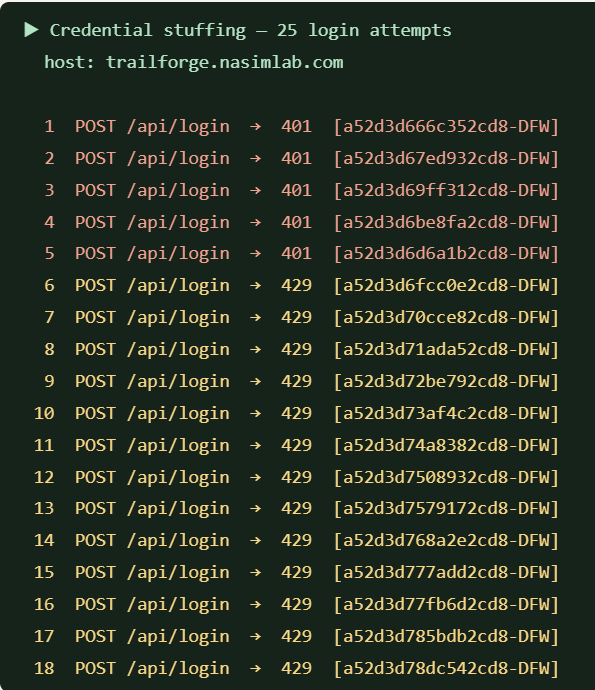
The browser-side result is exactly the sequence I wanted to be able to show. From my own network, the first five login attempts reached the application and returned 401 because the credentials were wrong. The sixth attempt and the remaining 19 returned 429: Cloudflare’s rate limit had taken over, so those attempts were no longer being passed to the origin as ordinary login requests. The lab’s summary for the full 25-request run was five 401s, twenty 429s, and 3.6 seconds elapsed.
That difference between 401 and 429 matters. A 401 means the origin evaluated the credentials and rejected them. A 429 means the edge decided the client was sending too many requests and stopped the attempt there. The protection is not guessing whether the password is right; it is limiting how many guesses the client gets to make.
Blocking /admin
The simplest custom WAF rule blocks every request to /admin on the TrailForge hostname.
There is nothing subtle about it, and that is why I like it as a teaching example. A sensitive path that should not be publicly reachable does not need a complicated score or a machine-learning model. It needs a clear rule that a reader can understand in five seconds.
Verified through the proxied hostname, /admin now returns 403.
SQL injection and XSS: being honest about the Free managed ruleset
This is where the difference between plan tiers became impossible to ignore.
I deployed Cloudflare’s Managed Free Ruleset. It is real protection, but its 38 rules are heavily oriented toward known content-management systems and specific vulnerabilities — WordPress plug-ins, Confluence issues, and other named CVEs. It does not contain the broad, generic SQL injection and XSS signatures I had expected from the full managed rulesets available on higher plans.
My first tests proved the point. A classic SQL injection probe and an XSS probe initially reached the application and returned 200.
So I added a second custom WAF rule for the demonstration. It inspects the URL-decoded query string and blocks a small set of obvious patterns, including:
union selector 1=1sleep(benchmark(<scriptalert(onerror=javascript:drop tableinformation_schema
The first version of the rule still missed the SQL payloads. The reason was useful: the query string reaching the rule was not fully decoded for things like encoded spaces and equals signs. I changed the expression to run url_decode() over the query before applying lower() and the pattern checks.
After that change, the same tests behaved the way the lab promised:
- Classic SQL injection probe →
403 UNION SELECTprobe →403- XSS probe →
403 - Normal search for “tent” →
200
The lab caught one more gap later, and I am glad it did. Its fifth SQL payload — a time-based sleep(5) attempt — came back 200 because sleep( was not in my pattern list. The application has no SQL database behind search, and the whole run finished in 0.4 seconds, so nothing actually slept; but the probe had still found a hole in the pattern list. I added sleep( and benchmark( to the rule and retested the same payload: 403, while a normal search for “sleep” still returns 200.
I am calling this what it is: demo-grade pattern matching, not a replacement for a mature managed ruleset. A production WAF inspects normalized input, headers, paths, and request bodies with a much larger and more carefully tuned signature set. My rule only inspects the query string, and a determined attacker could look for ways around a short pattern list. But for this project, it restores the visible security behavior without pretending the Free plan gave me Enterprise signatures for free.
What the scraping test cannot prove on the Free plan
The lab can still generate the catalog-scraping pattern: 40 sequential product API reads. What it cannot do on this zone is show me a meaningful Cloudflare bot score for each request. The /edge page receives no bot-score header, so it displays a dash.
That matters because a traffic pattern and a mitigation decision are not the same thing. I can generate suspicious-looking traffic. Without the score, I do not have the same signal I would use on a higher plan to decide whether to log it, challenge it, or block it.
Again, I would rather show the missing signal than hide it.
TLS was not one decision; it was two
Cloudflare’s SSL/TLS mode for the NasimLab zone is Full (strict). That means both parts of the connection are encrypted:
- The visitor connects to Cloudflare over HTTPS.
- Cloudflare connects to my origin over HTTPS and validates the origin certificate.
I was not willing to use Flexible mode just to make setup easier. Flexible leaves the Cloudflare-to-origin leg unencrypted, which defeats much of the point of configuring TLS carefully.
The original TrailForge build used two different certificate approaches:
- A Cloudflare Origin CA certificate for the proxied hostname
- A publicly trusted Let’s Encrypt certificate for the grey-cloud hostname
That split taught me something easy to miss. An Origin CA certificate is trusted by Cloudflare for the origin connection, but a visitor’s browser does not trust it directly. If the grey-cloud hostname used that certificate, the browser would show a warning right in the middle of the comparison the demo depended on.
For the NasimLab revival, I simplified the setup. One Let’s Encrypt certificate covers both trailforge.nasimlab.com and origin-trailforge.nasimlab.com, Nginx presents it on both virtual hosts, Full (strict) validates it for the proxied connection, and browsers trust it for the direct connection. Certificate renewal is automated, and the current certificate runs to January 28, 2027.
One certificate, both trust models satisfied.
The access-gate lesson I did not expect
The original version of TrailForge eventually became private. I only wanted to reach it from browsers that had first visited with a secret key, after which the application set a long-lived access cookie and an Nginx rule allowed the request through.
The first version of that gate appeared to work on the direct hostname but failed through Cloudflare. The reason was sitting in plain sight: Cloudflare was serving a cached copy, so the request never reached Nginx. An origin-side gate cannot reject a request it never receives.
Fixing it required changing both layers:
- Nginx checked for the key or access cookie.
- The cache rules only treated a request as cache-eligible when the access cookie was present.
Without the cookie, the request bypassed the cache, reached the origin, and received 403. With the cookie, the same page could still be served as a cache HIT.
That became one of my favorite lessons from the project: security controls do not live in isolation. A change at the origin can be silently bypassed by a perfectly correct cache doing exactly what it was configured to do.
For the NasimLab revival, I made the opposite choice on purpose. TrailForge is now a public portfolio project, so there is no access key. The lab is open, but the site is fictional, there are no real customer accounts or payments, and the login endpoint is rate-limited.
Problems I hit while building and reviving it
Some of the most useful parts of this project were the failures.
| Problem | What caused it | What I changed |
|---|---|---|
Nginx rejected an http2 directive | The configuration used syntax from a newer Nginx than Ubuntu 22.04’s packaged version | I used the older listen 443 ssl http2; form supported by the installed server |
Cloudflare returned 526 Invalid SSL certificate | The zone was set to Full (strict), but the origin still had a temporary certificate | I installed a certificate that Cloudflare could validate instead of weakening the TLS mode |
| The direct hostname failed in a browser | The Origin CA certificate was not publicly trusted | I used Let’s Encrypt for browser-facing direct access |
| A 404 stayed cached for five minutes | The catch-all cache behavior reached the error response | I made 404 responses no-store |
| The private gate did not stop proxied traffic | Cloudflare answered from cache before the origin gate could run | I made cache eligibility depend on the access cookie as well |
| The revived app would not simply start where it left off | The service had been disabled, its old proxy snippet had been replaced with a 503 offline stub, and the separate environment file was empty | I reconstructed the public configuration, put the required environment in the new systemd unit, and enabled the service |
| API rule writes returned “not authorized” | The Cloudflare token did not yet have every permission the work needed | I added permissions in stages — DNS first, then cache and settings, then firewall services — and verified each phase separately |
| SQL patterns still passed after the custom rule was added | The query string needed explicit URL decoding before the pattern match | I wrapped the query field in url_decode() and retested |
A catalog request carrying a session cookie was served a cache HIT after I widened the catalog rule | When two cache rules match, the later rule’s settings win — the catalog rule sits after the bypass rule, so it silently overrode the session bypass on shared paths | I added an explicit “no tf_session cookie” condition inside the catalog rule itself, so the guard no longer depends on rule ordering; session requests now return DYNAMIC on every catalog path |
None of these were exotic problems. That is why they were valuable. They are the same kinds of problems that appear during a real migration: a version difference, a certificate trusted by one party but not another, a cache preserving a mistake, a control applied at the wrong layer, and an API token with almost — but not quite — the permissions required.
Bringing it back on NasimLab
The revival was not a redeployment from a neat public repository. The working application was still on the droplet, but it had been deliberately taken offline. I had partial web archives and then a complete source copy, including the build log, Cloudflare configuration notes, deployment templates, and demo runbook.
That documentation mattered. I did not have to guess why the two hostnames existed, why Nginx forwarded static files to Node, or why the session cookie belonged in the bypass rule. The reasoning had been written down when the choices were made.
The revival work itself came down to a few clear steps:
- Verify that the droplet and the application files were intact.
- Replace the old held-domain names in the application with the NasimLab hostnames.
- Restore the reverse-proxy configuration without the old private gate.
- Create a systemd unit with the public configuration and enable the service.
- Add the proxied and DNS-only records in Cloudflare.
- Issue a Let’s Encrypt certificate covering both names.
- Confirm the site over HTTPS through both doors.
- Apply the cache rules.
- Add the firewall and rate-limit rules when the token had the required permission.
- Retest the public site, the direct origin, the cache states, and the neighboring NasimLab sites.
I was careful not to treat the shared droplet or the shared Cloudflare zone as if TrailForge were the only thing living there. The cache rules and TrailForge-specific custom firewall rules are scoped to the TrailForge hostname. The Managed Free Ruleset is a zone-level protection, so I checked that the blog and the main NasimLab site still worked after deploying it.
What I verified in the revived version
I do not consider a configuration finished because the dashboard accepted it or an API returned success. The result has to be visible from the outside.
| Check | Result |
|---|---|
| Proxied homepage | 200 over HTTPS |
| Direct-origin homepage | 200 over HTTPS |
/lab, /edge, and /ops | 200 |
| Origin health endpoint | {"status":"ok","origin":"trailforge-origin-nyc1"} |
| Home, shop, product, and sale pages after warm-up | cf-cache-status: HIT |
| Product and category APIs after warm-up | cf-cache-status: HIT |
| CSS and favicon after warm-up | cf-cache-status: HIT |
Catalog request carrying a tf_session cookie | cf-cache-status: DYNAMIC |
| Cart, checkout, account, login, lab, ops, and edge pages | cf-cache-status: DYNAMIC |
/admin through Cloudflare | 403 |
| SQL injection probes through Cloudflare | 403 |
| XSS probe through Cloudflare | 403 |
| Normal product search | 200 |
| Credential-stuffing burst from my browser | First five attempts 401; sixth and later attempts 429 |
| Cloudflare door counter | Increased by one after one proxied request |
| Direct door counter | Increased by one after one direct request |
| Blog and main NasimLab site | Still returned 200 after the zone changes |
That table is the project in miniature: public content is offloaded, private content is not cached, obvious attack strings are stopped, normal use still works, and the origin can show what it actually handled.
The trade-offs I accepted
TrailForge runs on one 1-vCPU, 1 GB droplet. It is a single point of failure. The application’s operational counters and session data are designed for demonstration, not for running a real retail business. There is no real payment processor, no customer database I need to protect, and no claim of high availability.
I also accepted these platform trade-offs in the revival:
- The Free plan cannot exclude tracking parameters from the cache key.
- The Free managed ruleset is narrower than the full managed and OWASP rulesets.
- The Free plan provides only one rate-limiting rule, so I protected login before checkout.
- Bot-score data is not available to the origin in the way the original design expected.
- A short custom pattern list is not equivalent to a professionally maintained WAF signature set.
Could I hide all that in the article and make the project sound more complete? Of course. It would also make the article less trustworthy. Knowing which control is real, which one is a simplified substitute, and which one is still missing is part of operating the system.
What this project taught me
Measurement changes design decisions
I routed static files through Node because I wanted the counters to be right. I put timestamps and sequence numbers in the footer because I wanted caching to be visible without special tools. I created two hostnames because I wanted a control group.
None of those choices made the store look better. All of them made the truth easier to see.
Caching is about boundaries
The interesting question was never “Can I get a HIT?” It was “What am I willing to share, with whom, and for how long?”
A product description, a cart, a live inventory count, and an authenticated account page may appear on the same screen, but they do not belong in the same cache class.
Security controls have to fit the endpoint
Login, checkout, search, and an administrative path expose different risks and different false-positive costs. A firm block can be right in one place and irresponsible in another. Rate limiting, challenges, managed signatures, and custom rules are not interchangeable labels; they are different decisions.
A correct layer can bypass another correct layer
The access-gate problem stayed with me. Nginx was doing its job. Cloudflare’s cache was doing its job. The system was still wrong because the two jobs had not been designed together.
That is usually where real infrastructure problems live — not inside one component, but between components that each look correct when tested alone.
Written reasoning is a feature
When I came back to it weeks later, the build log let me revive the project without reverse-engineering my own intentions. The code said what the system did. The notes said why. I needed both.
What I want to do next
TrailForge is useful now, but I can see the next round of work clearly:
- Add a second layer for checkout abuse. The current Cloudflare rule is reserved for login. An origin-side Nginx limit or a future plan change could give checkout its own treatment without weakening the login rule.
- Test cache purging deliberately. I want a documented before-and-after example of changing a product, purging the relevant URL, and proving that the new copy is what the edge serves.
- Put the source under clean version control. The project deserves a repository without the accumulated backup copies and with the deployment and Cloudflare configuration documented as code.
- Add basic operational discipline. Uptime checks, a backup I have actually restored, and an alert if the service stops would make NasimLab more honest as an operations lab.
- Revisit managed WAF coverage if the plan changes. If the zone moves to a plan with the full Cloudflare Managed Ruleset and OWASP Core Ruleset, I would deploy OWASP in log mode first, review false positives, and only then consider blocking.
Why this belongs in my portfolio
I am working toward cloud architecture and solutions roles because I like understanding how systems fit together. TrailForge is one of the clearest examples I have of that way of thinking.
It is not just a Node application. It is DNS choices, TLS trust models, reverse-proxy behavior, cache correctness, origin measurement, API design, WAF rules, rate-limit trade-offs, plan limitations, and the operational work of bringing a disabled service back without disturbing the other sites beside it.
Most importantly, it lets me show my work. I can open the site, explain the request path, run the tests, and point to the counters. If a result is limited, I can say exactly why.
That is the kind of engineer I am trying to become: not someone who repeats that a system is fast and secure, but someone who can demonstrate what is fast, what is protected, what is not, and how he knows.
Try it
- Storefront through Cloudflare: trailforge.nasimlab.com
- Edge diagnostics: trailforge.nasimlab.com/edge
- Origin load console: trailforge.nasimlab.com/ops
- Demo lab: trailforge.nasimlab.com/lab
- Same origin without Cloudflare in the path: origin-trailforge.nasimlab.com
Technical references
- Cloudflare Cache Rules
- Cloudflare origin cache control
- Cloudflare Full (strict) SSL mode
- Cloudflare rate limiting rules
- Cloudflare Rules language functions, including
url_decode - Nginx
ngx_http_proxy_module