Field notes
Two Apps, One Folder: How CallScribe and Prompter Talk Without an API
Most integration stories start with an API. Mine starts with a folder.
CallScribe is a Windows tool I built to turn live speech into text on my own machine, with no audio leaving the computer, and to prepare suggested answers from my own notes while I practice technical conversations out loud. Prompter is a second, separate application: a teleprompter-style display that shows text in sections I can jump between with hotkeys.
The interesting problem was never the transcription. Whisper is very good, and running it locally is a solved problem. The interesting problem was this: how do two independent programs cooperate, one producing answers, the other displaying them, without becoming one program?
I did not want a shared library, a local HTTP API, or a plugin system. I wanted either app to be replaceable, either app to crash without taking the other down, and the whole exchange to be inspectable with nothing more than a file explorer. So the integration is a watched folder and a naming rule. This post is about that contract, the privacy decisions inside it, and what measuring the system honestly looks like.
A note on scope: I maintain more than one build of CallScribe. Everything in this post describes the general build: local transcription, prepared answers from my own notes, an optional AI layer, and the Prompter bridge. That is the build I run, test, and am describing here.
At a glance
| Question | Answer |
|---|---|
| What is CallScribe? | A Windows application that captures the other side of a conversation, transcribes it locally with Whisper (faster-whisper) on my own GPU, and prepares suggested answers, first from my own prepared notes, optionally from an AI model I configure |
| What is Prompter? | A separate display application that presents text in sections, navigable by global hotkeys, search, and an edit mode |
| How do they communicate? | A watched inbox folder. CallScribe writes one JSON file per answer; Prompter turns each file into a new section |
| What is the file contract? | {"title": ..., "text": ...}, written to a .tmp file and atomically renamed to .json so the reader never sees a partial write |
| Where does the audio go? | Nowhere. Audio is captured, transcribed, and discarded on the same machine; it is never written to disk and never uploaded |
| When does text leave the machine? | Only when I switch the AI layer on, and only to the endpoint I configured. It is off by default |
| What happens if Prompter is not running? | Uncollected inbox files are swept after five minutes instead of accumulating on disk |
| How is accuracy checked? | The project ships its own evaluation command that transcribes a known clip against a reference transcript |
| What did I verify? | Local transcription, the opt-in boundary, the bridge contract, the stale-file sweep, the provider design, and a 61-check offline smoke suite (59 passing in a clean sandbox; the 2 exceptions were a missing HTTP library in that sandbox, not application failures) |
The problem I was actually solving
I practice technical conversations the way I study anything: out loud, against realistic questions, with my own notes nearby. The tool I wanted had three properties that cloud transcription services do not offer by default.
First, the audio had to stay home. A practice session is still a conversation. I did not want recordings, or even audio snippets, uploaded to a transcription API as a side effect of getting text on my screen. Local speech-to-text had to be the default path, not a settings page promise.
Second, help had to be optional and visibly bounded. Prepared answers from my own notes are instant and offline; they should always be available. An AI model’s suggestions are a different category of thing, because text leaves the machine, so that layer needed to be off by default, behind an explicit switch, pointed at an endpoint I chose.
Third, the display had to be its own program. A teleprompter that shows one section at a time, jumps by hotkey, and survives independently is useful with or without transcription behind it. Gluing it into the transcription app would have made both worse.
Those three properties produced two applications and one integration question.
CallScribe: local transcription, answers in layers
CallScribe captures the other side of the conversation through WASAPI loopback, meaning it hears what my speakers play, not my microphone, and feeds that stream to faster-whisper running on my GPU.
The capture pipeline taught me more than the model did. A few design points that earned their place:
An adaptive voice gate. A fixed energy threshold for “someone is talking” fails the moment a call is quieter or louder than the last one. The transcriber tracks the stream’s own noise floor and adapts its gate to it. There is also a --calibrate mode that simply measures the capture stream, silence levels with nobody talking, then speech levels, and tells me the numbers, instead of me guessing a threshold and discovering it was wrong mid-conversation.
Partial captions are not final transcripts. While someone is speaking, the app shows fast, low-beam partial captions so the screen feels live. But a partial is never what gets committed as the transcript. The committed line always comes from a full decode of the finished utterance (temperature pinned to 0.0, a proper beam), because a sentence you act on should not be the draft the model was still revising.
Bounded queues, on purpose. If transcription falls behind, captured audio used to accumulate, and delayed help is worse than slightly incomplete help. The audio queues are now bounded to a few seconds and drop the oldest chunks. The system stays live instead of becoming a recording of the past.
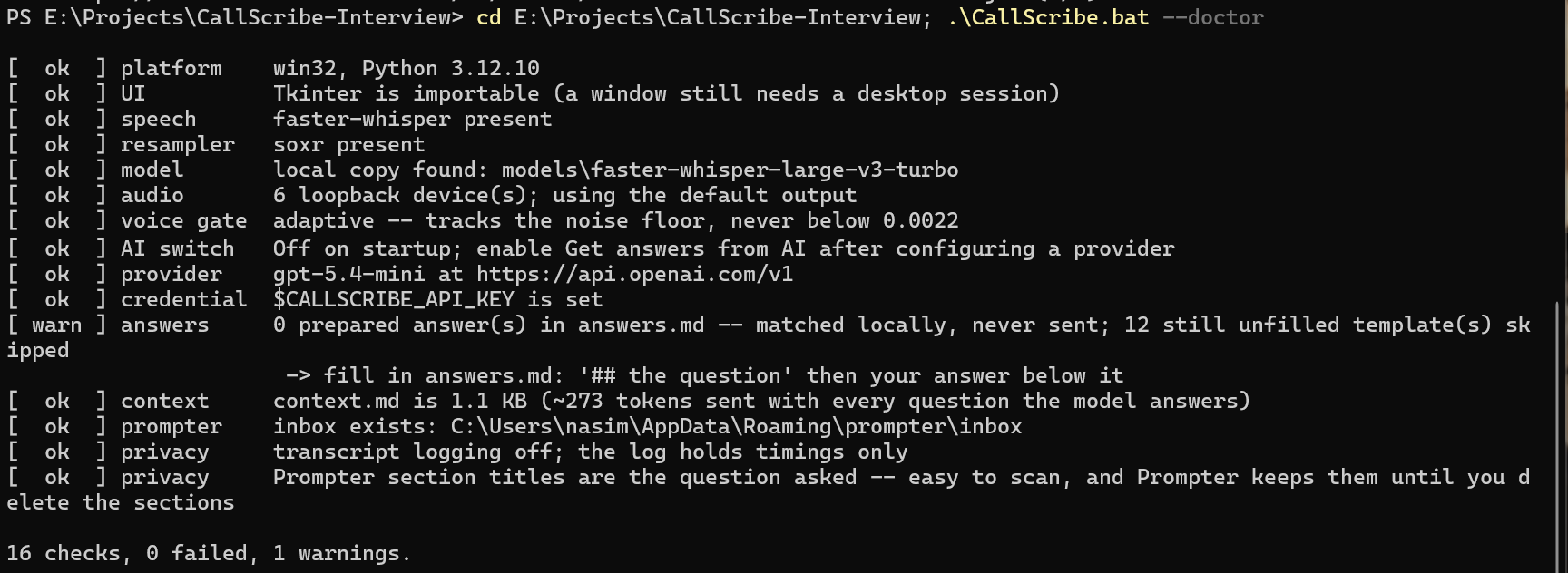
A doctor before a demo. CallScribe.bat --doctor runs sixteen checks over the whole setup (Python environment, speech model, audio device, voice gate, provider, credential, inbox, privacy settings) and reports failures with the command that fixes them. On my machine today it reads: 16 checks, 0 failed, 1 warning, the warning being that my prepared-answers file still has unfilled templates in it, which is true and worth knowing before a call rather than during one. A checker that only ever says “ok” is decoration, so the warning stays in the screenshot. Tools that only fail during the real event are not finished tools.
Answers, in the order I trust them
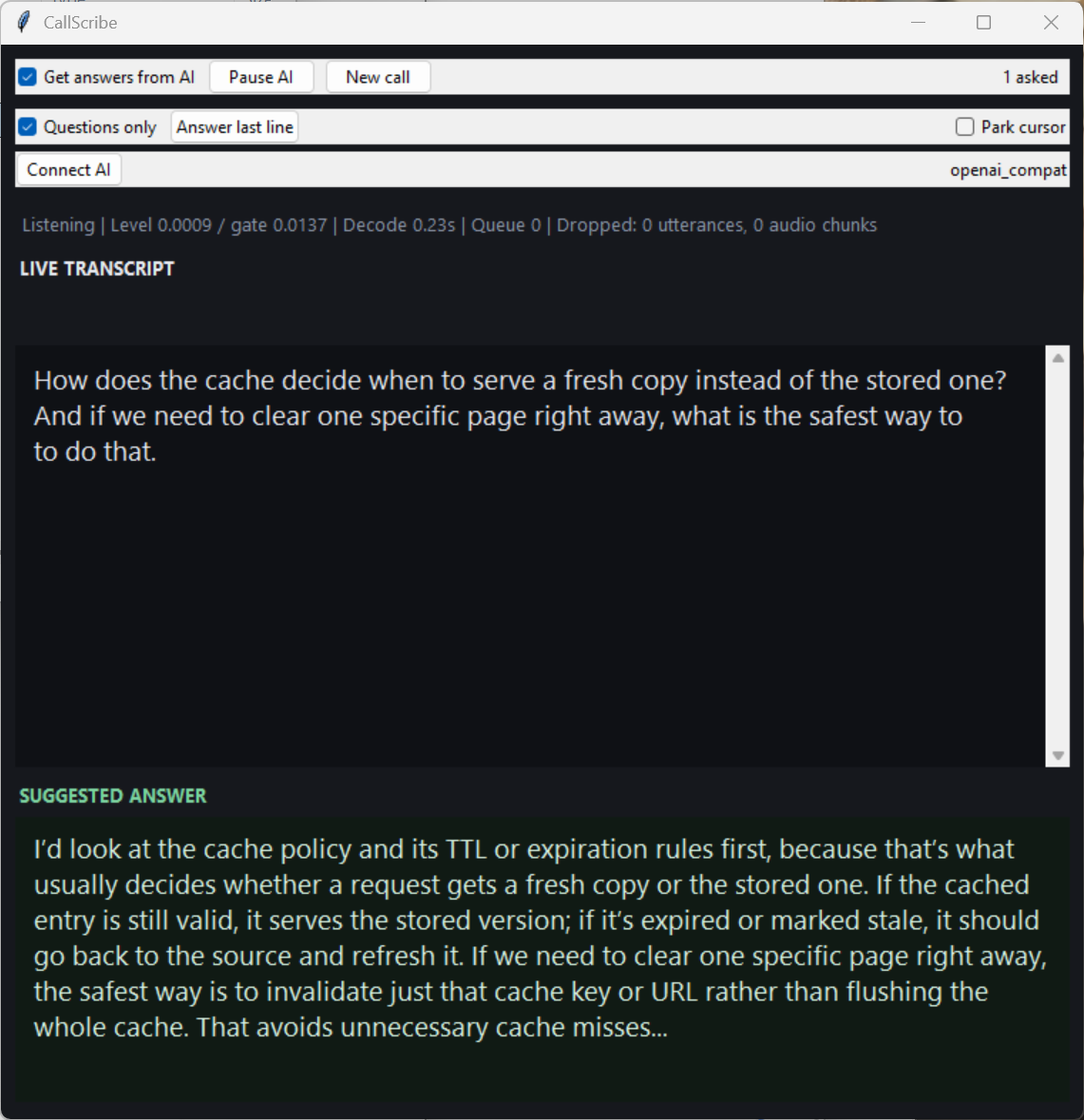
When a question is detected, the answer comes from the first layer that can honestly produce one:
- My prepared notes. My background file (
context.md) is organized under headings. When a spoken question closely matches a heading, the text under it appears instantly: offline, no model, in my own words, because I wrote it. - An AI model I configure. If the notes do not match and I have switched the AI layer on, the question goes to the configured endpoint (the current build uses an OpenAI-compatible streaming provider), and the answer streams into the pane. Off by default; on only by my action.
Two details from a recent fixes pass belong here, because they are the kind of bugs demos never show. A slow answer to an old question used to be able to finish late and overwrite the answer to the new one. The providers now carry request IDs, and stale answers are suppressed. And the model used to receive a synthetic prompt (history, titles, instructions) as if it were the question, which then leaked into the UI and into Prompter’s section titles. The app now keeps the clean question for display and history, and sends the rich prompt only to the model. Same system, two very different behaviors, and the difference is invisible until you trace what each consumer actually receives.
Prompter: the display is a separate program
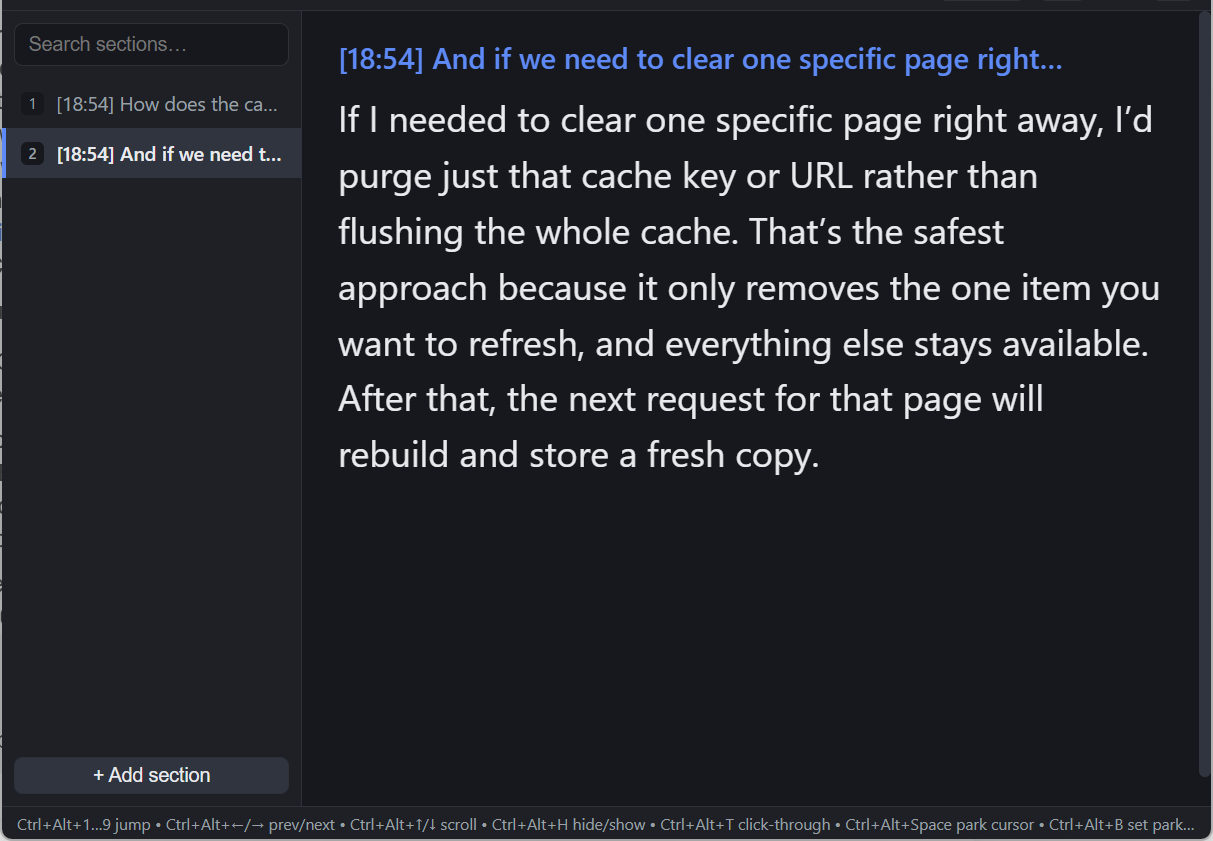
Prompter shows text the way a speaker actually needs it during a conversation: in sections. A sidebar lists them; number hotkeys and Ctrl+Alt navigation jump between them instantly; a quick search filters by text; an edit mode manages the content; font size and opacity adjust live. It remembers its window, its settings, and its sections between launches, and it knows nothing about transcription, Whisper, or AI. Its inputs are a person typing, and one folder.
That ignorance is the design. Prompter is a good display for rehearsed material whether the text was typed by hand, written by another tool I control, or delivered by the bridge described next.
The contract: one folder, one file, one rename
Here is the entire integration protocol:
- CallScribe produces a suggested answer.
- It writes a small JSON file,
{"title": ..., "text": ...}, into Prompter’s inbox folder, under a temporary name:sec-<timestamp>.tmp. - It renames the file to
.json, atomically. - Prompter, which watches the folder, sees a complete file, turns it into a new section, jumps to it, and deletes the file.
CallScribe                              Prompter
──────────                              ────────
answer ready
  │
  ├─ write  sec-1699….tmp ──┐
  │                          ▼
  ├─ rename sec-1699….json ──►  inbox watcher sees a COMPLETE file
  │                               │
  │                               ├─ new section appears
  │                               └─ file deleted
  │
  └─ if nobody collects it in 5 minutes: swept and deleted
Why a folder instead of an API? Because every property I wanted falls out of the filesystem for free:
- No partial reads, ever. A watcher that reacts to file creation will eventually read a half-written file. Writing to
.tmpand renaming means the.jsonname only exists once the content is complete. Rename-within-a-folder is atomic on the filesystems involved, so the reader’s rule can stay dumb: if it ends in.json, it is finished. - Crash isolation. If Prompter is closed, CallScribe keeps working and the inbox simply holds files. If CallScribe closes, Prompter keeps displaying what it has. Neither process can hang the other, because neither process calls the other.
- Inspectability. When something misbehaves, I open the folder and look. The interface between my two programs is a thing I can see, count, and read with Notepad. Debugging an integration by opening a directory is a genuinely pleasant experience compared to tracing a local socket.
- Replaceability. Anything that can write that JSON shape can feed Prompter; anything that can watch a folder can consume CallScribe’s answers. The contract is the product. The two apps are just its current endpoints.
This is the same architectural instinct I keep meeting in infrastructure work: small explicit contracts between components, boring transport, and failure behavior decided in advance instead of discovered in production.
Privacy decisions, made in the code
Local-first was the headline, but the smaller decisions are the ones I am prouder of, because they are about what persists after the moment passes.
Audio is never stored. The capture stream exists in memory, is transcribed, and is discarded. There is no recording file to leak, subpoena, or forget about. Transcript logging is also off by default in the shipped configuration.
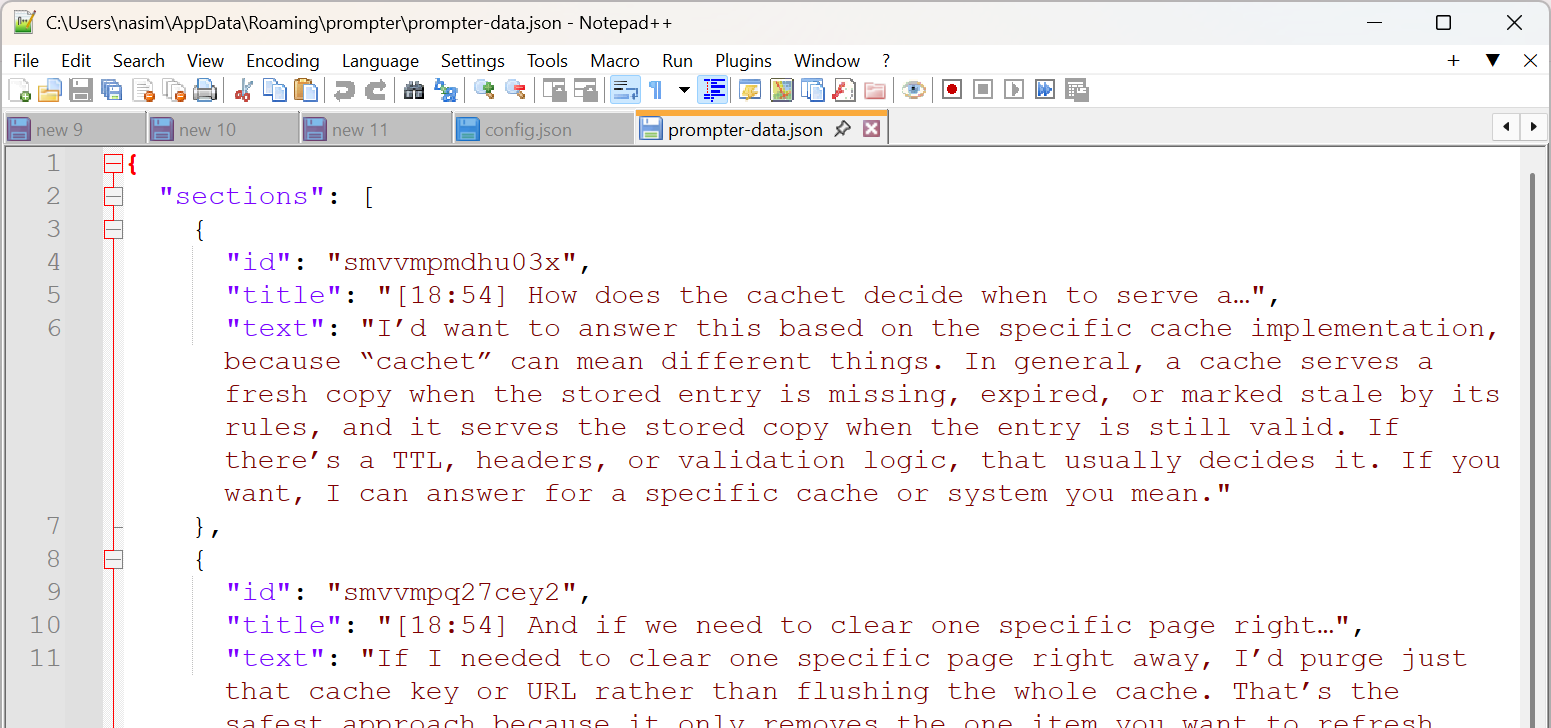
Section titles are a privacy surface. Here is the subtle one. Prompter saves its sections to disk. That is a feature; it is how your material survives a restart. But it means a section title survives too. If the title is the other person’s question, their words are now sitting in a data file on my machine indefinitely. So the bridge has two title modes: question mode, which embeds a trimmed version of the question because it makes sections scannable, appropriate for rehearsal with fictional material, and timestamp mode, which titles sections [14:32] Answer and keeps the other party’s words out of the persistent file entirely. The mode exists because I traced where the data flows after the call ends, not just during it.
Uncollected answers delete themselves. If Prompter never collects an inbox file (it was closed, it crashed, the moment passed), CallScribe sweeps the inbox and deletes anything older than five minutes. The alternative, an inbox that quietly accumulates every answer I was ever given, is the kind of data pile you only notice when it embarrasses you.
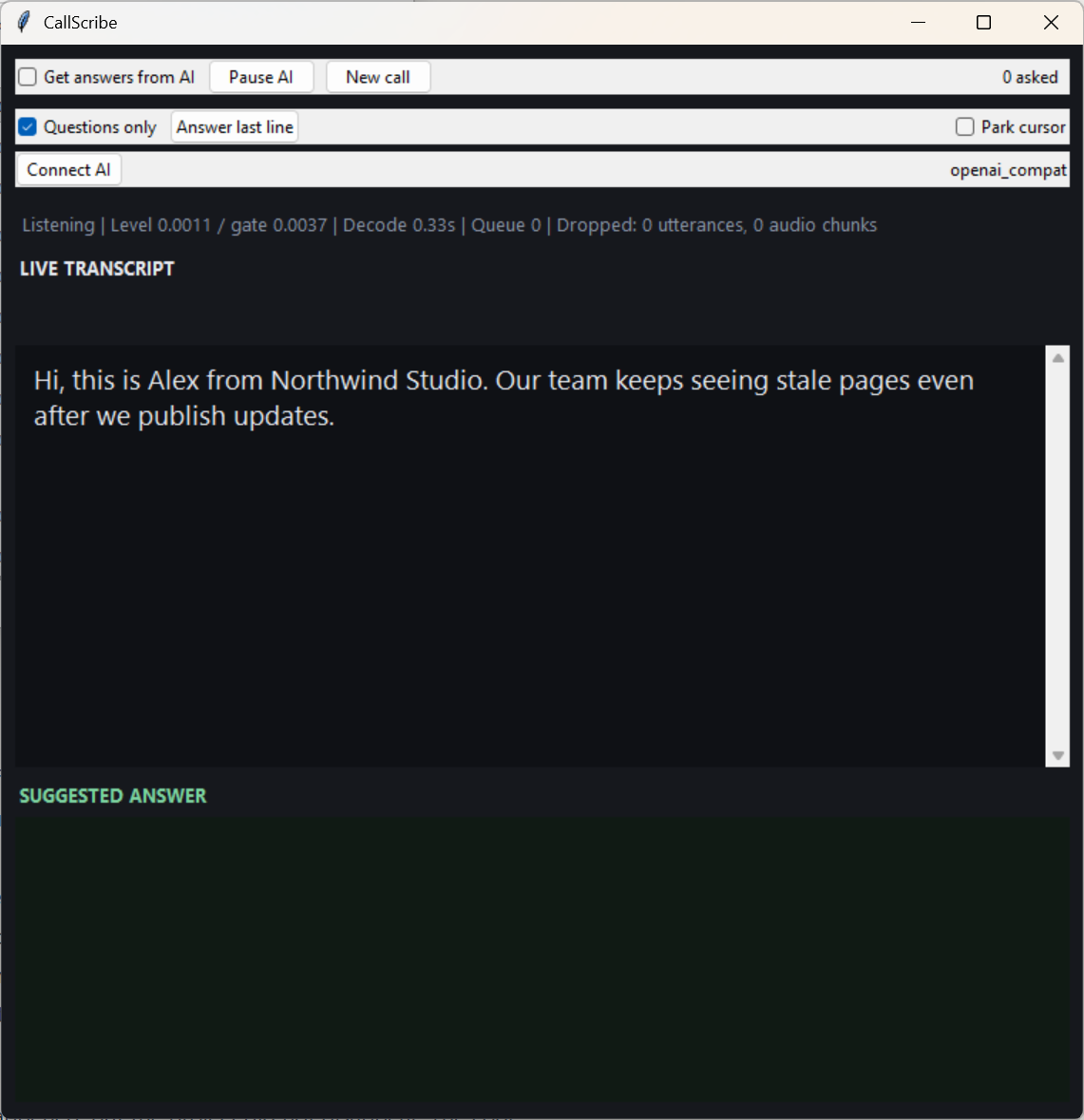
The AI boundary is a switch, not a vibe. ai_answers_enabled ships as false. With it off, no text leaves the machine, and in the demo that is a testable claim, not a promise: with AI off, the transcript appeared and the answer pane stayed empty; the inbox stayed empty; Prompter gained no section, because the bridge is fed by the answer pipeline and the answer pipeline was off. The transcription still ran. The boundary is visible in the filesystem.
What happens when the other side isn’t there
I designed for four absences:
- Prompter absent: files wait, then the sweep deletes them. CallScribe does not block, retry-storm, or error.
- CallScribe absent: Prompter is a complete standalone app. Nothing about it degrades.
- The model absent or slow: prepared-note answers still work instantly, and bounded queues keep the transcript live instead of letting work pile up behind a slow provider.
- The answer is stale: request IDs mean a late answer to a superseded question is dropped, never displayed over the current one.
None of these behaviors required heroics. They required deciding, in advance, what each component owes the others, which is the whole argument for explicit contracts in the first place.
Measuring instead of guessing
The project ships its own evaluation path: give it a WAV file and the exact reference text, and it transcribes the clip with the production settings and reports how the output compares:
python -m callscribe --transcribe sample.wav --reference truth.txt
The evaluator is deliberately strict about its input: uncompressed 16-bit PCM WAV, or it refuses the file. (I know because my first recording was an m4a from my phone, and it refused that.) Local, explicit, and unimpressed by convenience: that is the right temperament for a measurement tool.
The live demo had already taught the same lesson the evaluation was about to quantify. On one run, the transcription misheard the word “cache” as “cachet”. Nothing downstream checked it. The model answered the word it was actually given (its answer politely noted that “cachet” can mean different things), and the section title saved the typo into Prompter’s data file, where it will live until I delete the section. One wrong word, propagated faithfully through three components that were each working exactly as designed. A pipeline does not know the difference between data and an error; it moves both with the same reliability. That is worth designing for, and it is why the number below gets published with its causes attached instead of rounded into a claim.
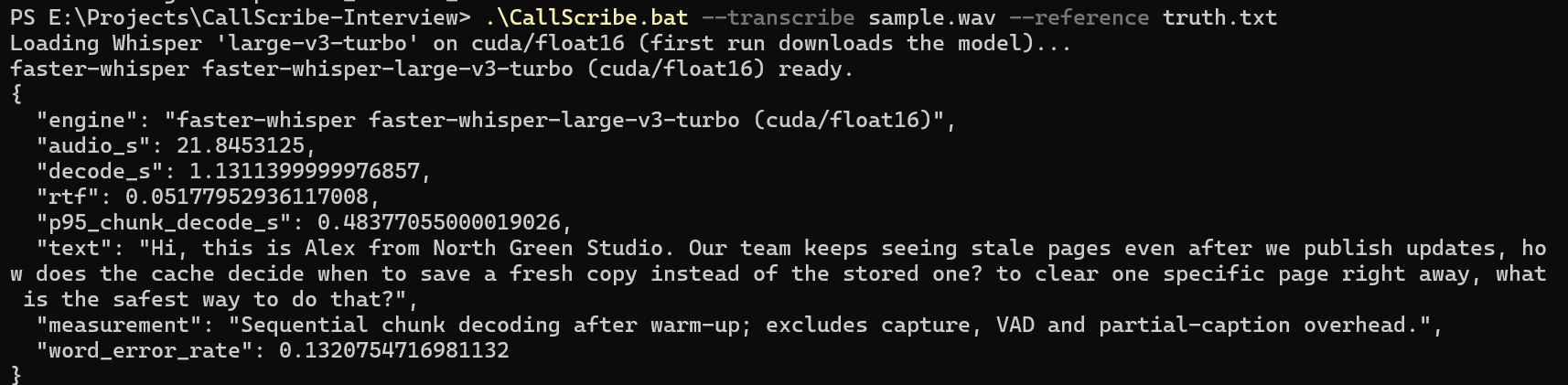
Here is the actual output of that command, run on the general build on my own machine, on a 21.8-second clip of my own voice reading the fictional three-line script used throughout the demo. No real conversation, nothing cherry-picked:
| Measurement | Result |
|---|---|
| Engine | faster-whisper, large-v3-turbo, CUDA / float16 |
| Audio length | 21.8 s |
| Total decode time | 1.13 s |
| Real-time factor | 0.052, about 19× faster than real time |
| Word error rate vs. the script | 0.132 (13.2%) |
And here is what the errors actually were, because the aggregate number hides them: “Northwind Studio” came back as “North Green Studio,” “serve” became “save,” and the fixed-length chunking the evaluator uses dropped the opening words of the third line at a chunk boundary. In other words, the model handled ordinary speech essentially perfectly and stumbled on exactly the two things you would predict: a proper name it had never seen (which is what the configuration’s whisper_initial_prompt vocabulary hint exists for), and a decoding boundary artifact of the harness rather than the live pipeline. I am publishing the 13.2% as measured, with its causes attached. A number whose failure modes you can name is worth more than a smaller number you cannot explain.
The offline smoke suite gets the same treatment: it encodes the decisions as checks, covering the bridge contract, the provider behaviors, and, my favorite, a guard that the configuration from other builds does not leak into this one. Configuration drift between builds is exactly the sort of thing that “works on my machine” hides until it matters.
What I would do next
- Package the demo as a repeatable script. The synthetic run (fictional script, AI off, AI on, evaluation) should be one documented procedure anyone can re-run to reproduce every claim in this post.
- Publish the general build’s repository cleanly. The code deserves a public repo with the configuration examples, the privacy document, and the smoke suite visible. The engineering is the portfolio.
- A small latency budget, written down. The system has informal targets (instant for notes, a couple of seconds streamed for the model). Writing them as a budget with the measurement method would turn “feels fast” into something checkable.
- Keep the builds separate. The general build stays free of context-specific features. The moment a general tool grows a mode for one environment, its privacy story and its test surface both get harder to reason about. I would rather maintain the boundary than the exception list.
References
- Live demo surface and my other infrastructure work: NasimLab
- faster-whisper (the local speech-to-text engine CallScribe builds on)
- OpenAI-compatible chat completions API shape (the provider interface the AI layer targets)
Nasim Bayati: cloud engineer working toward AWS Solutions Architect Associate (SAA-C03), focused on infrastructure, networking, security, and systems that explain themselves.