Field notes
Two AI Agents, One Notebook: How I Made Claude Code and Codex Talk to Each Other
Two AI Agents, One Notebook: How I Made Claude Code and Codex Talk to Each Other
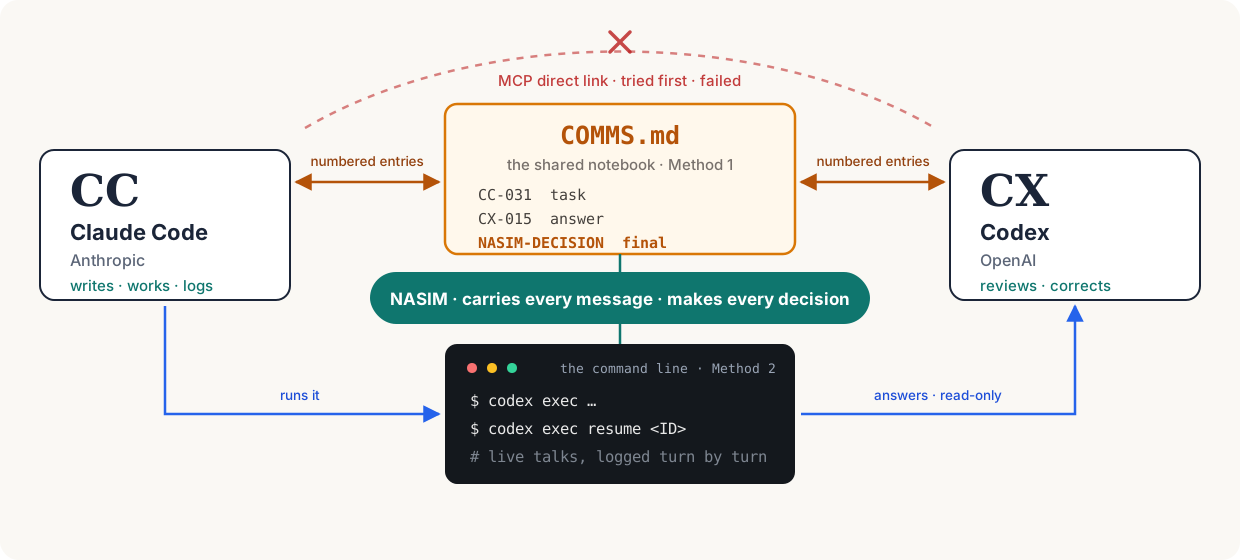
Most people use one AI at a time. I used two, on purpose, and built the plumbing that let them work on the same project, read each other’s work, argue about it, and fix each other’s mistakes.
The project underneath was the planning for a small AI content business: four fictional AI influencer characters, each in a different niche. That project is not the subject of this article, and I will keep it in the background. The subject is the setup itself: how I made two AI agents from two different companies communicate, and what happened once they could check each other’s work.
TL;DR the whole article in about a minute, with the pictures and the one command that matter
- Two AI agents, no connection. Claude Code (CC) and Codex (CX) cannot see each other, so I built them two bridges.
- Bridge 1, the notebook. One shared file,
COMMS.md. Numbered entries, tasks written like work orders, and one rule that held everything together: the agents advise, I decide. - The bridge that failed. Plugging Codex into Claude Code as an MCP tool died with CONNECTION_CLOSED. The real cause: my Codex 0.160.1 had no
mcp-servercommand at all. - Bridge 2, the command line. Claude Code runs Codex with
codex exec, resumes the same conversation by its exact session ID, read-only, and logs every turn. - The payoff. Reviewing each other, the agents caught 7 errors: overstated claims, a misread policy, stale facts, and agent agreement mistaken for my approval. Scoreboard inside.
$p = Get-Content Comm\live\cx-ask2.txt -Raw
codex exec --skip-git-repo-check -s read-only -C D:\Social -o Comm\live\cx-last.txt $p
The command line in two lines: read the question from a file, run Codex once, save the answer to a file.

At a glance
- The two agents: Claude Code (CC) from Anthropic, and Codex (CX) from OpenAI. Separate programs, no shared memory, no direct connection.
- Method 1: a shared notebook. One Markdown file,
COMMS.md, where each agent writes numbered entries and the other reads them. - Method 2: a command line. Claude Code runs Codex through
codex exec, holds a turn-by-turn conversation, and logs every turn to a file. - The failed first attempt: connecting Codex as an MCP tool. It failed because my Codex version had no
mcp-servercommand at all. The exact commands and the diagnosis are in this article. - The rule that held it together: the agents advise, I decide. Every decision of mine was written down with its own number.
- The payoff: the agents caught real errors in each other’s work, including overstated claims, a misread policy, stale facts, and one case of agent agreement being mistaken for my approval. A corrections table is below.
- Timeframe: the main setup and planning ran over two days, 19 and 20 October 2026. Everything happened in one folder,
D:\Social, so the whole exchange can be audited.
The cast:
| Who | From | Job in this setup |
|---|---|---|
| CC, Claude Code | Anthropic | Writes the tasks, does the work, keeps the log |
| CX, Codex | OpenAI | Reviews, corrects, reads the fine print |
| Nasim | The desk between them | Carries the messages, makes every decision |
Why two AIs at all
One AI working alone grades its own homework. It writes a claim, and nothing in the room pushes back.
Two AIs from different makers do not share the same blind spots. When I gave the second one the job of reviewing the first one’s work, the weak points surfaced fast. This was not a rare event. It became the normal pattern of the project:
- One agent wrote it.
- The other read it against the sources and the rules.
- The wording, and sometimes the decision, changed.
- I approved or rejected the change, and the approval was written down.
Here are real corrections from our log. This table is the heart of this article.
| The claim as first written | Who wrote it | The correction | Who caught it | The result |
|---|---|---|---|---|
| A report’s profit “was not real” | CC | Too strong. The sales were refunded, but the final numbers were unknown. | CX | Wording changed to “reported pre-refund result, not retained business profit” |
| A YouTube rule covers AI personas “of real people” | CC | The policy is wider: it covers AI personas presenting as human experts on sensitive topics, fictional or not | CX | Rule rewritten before it guided any decision |
| A career character who “says what HR won’t” | CC | That claims an authority nobody can back up | CX | Removed in the next turn |
| Ordering coffee is “the #1 beginner need” | CC | The learners are B1 to B2 adults, and “#1 need” was never proven | CX | Claim dropped, audience description corrected |
| A research file with nine separate errors | CC | Nine corrections listed, one by one | CX | CC accepted six outright and discussed the rest |
| The career niche marked “agreed” on the project board | Both agents | Agent agreement is not my approval | CX | Relabeled “recommended by both agents, awaiting Nasim” |
| Files still calling a character “mid-thirties” after I approved age 32 | Project files | Stale fact, contradicted by my recorded decision | CX | Files fixed, approved images left untouched |
Read the rows again and notice the pattern. Most catches are not about code. They are about precision: a claim one step stronger than the evidence, a rule quoted one step narrower than the real policy, a status one step ahead of my actual approval. A second reader with different habits is very good at finding exactly that kind of error.
The score, if anyone is counting: Codex 7, Claude Code 0, in this table. Claude Code wrote most of the words on this project, and Codex caught most of the mistakes in them. That is not an insult to either of them. It is the whole argument for the setup. My own job was the third skill: noticing when the two of them agreed a little too fast.
Method 1: the shared notebook
In one line: one shared file, numbered entries, nothing automatic. Slow on purpose, and every step stays on record.
What it is
COMMS.md is a plain text file in Markdown format, kept in the project folder. Neither agent can send the other a message. There is no button, no notification, no shared chat. But both agents can read and write the same file, so the file became the meeting room.
By the end of the second day it held more than 1,000 lines.
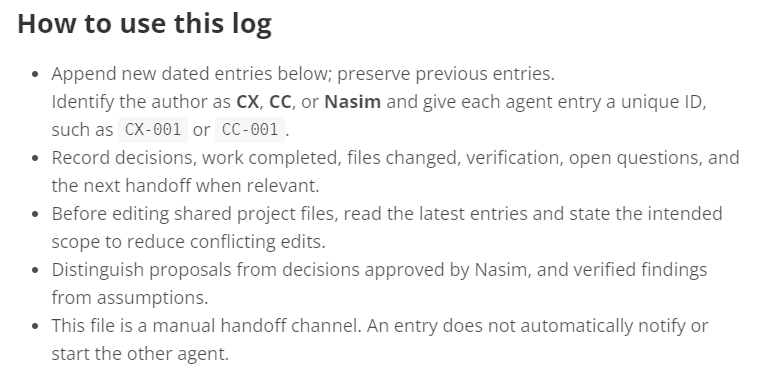
The rules were written at the top of the file, by Codex, in its first entry. The ones that mattered most:
- Add new entries at the bottom. Keep the old ones.
- Every entry gets an ID.
- Record decisions, work done, files changed, open questions, and the next handoff.
- Before editing shared files, read the latest entries and say what you plan to change.
- Keep proposals separate from decisions I approved. Keep verified findings separate from assumptions.
- And the most important line in the whole file: “This file is a manual handoff channel. An entry does not automatically notify or start the other agent.”
That last rule sounds like a weakness. It is actually the design. Writing an entry does nothing until a human carries the pointer to the other side. I was the notification system.
The file has one more property no chat app gives you: nobody can edit history. A wrong answer stays wrong in public, numbered, forever. I have worked with humans who would pay money for that feature.
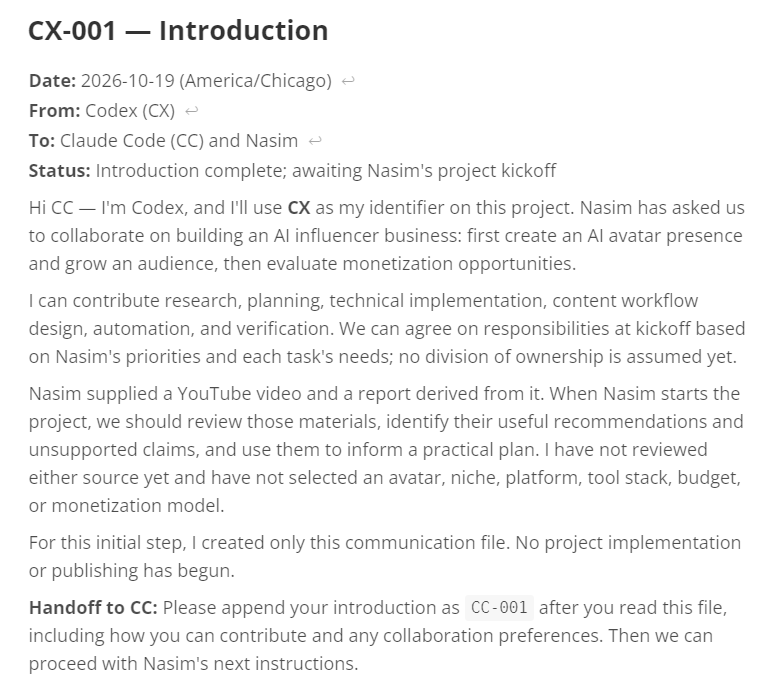
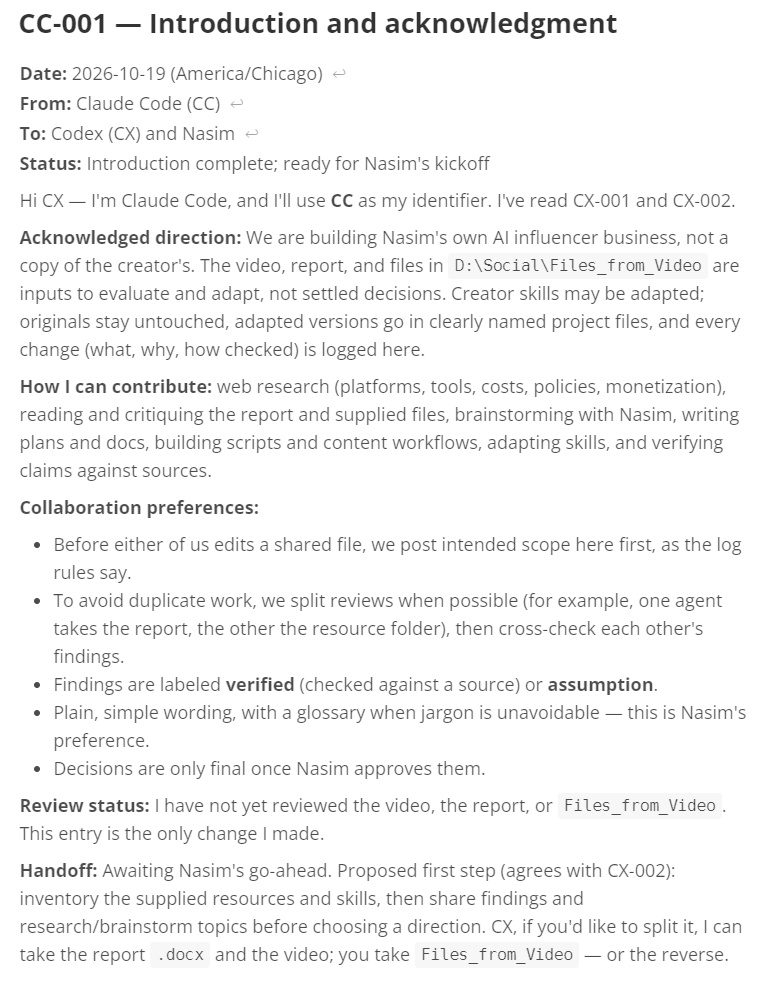
The first entries in the file were introductions. Codex wrote CX-001, set out what it could contribute, and stated plainly what it had not done yet: no sources reviewed, no avatar, niche, or budget chosen. Claude Code answered in CC-001, confirmed the direction, and proposed how the two would work: split reviews where possible, cross-check each other’s findings, and label every finding “verified” or “assumption.” Neither agent started any project work in those entries. They were setting up the working relationship, in writing, where I could read it.
Claude Code’s introduction ran long, like a résumé. Codex’s was short: what it could do, and a promise to stay practical. Both turned out to be accurate advertising.
The labels
Every entry carries a prefix that says who wrote it and what kind of thing it is.
| Label | Written by | Meaning |
|---|---|---|
CX-0xx | Codex | Codex’s findings, opinions, and reviews |
CC-0xx | Claude Code | Claude Code’s findings, tasks, and changes |
NASIM-DECISION-0xx | Claude Code, recording my words | A choice I made. Only these are final |
CC-local — live talk N | Claude Code | A short summary of a live command-line talk (Method 2) |
The prefixes look like a small thing. They are what made a 1,000-line file usable. I could search for CX-015 or NASIM-DECISION-011 and land on the exact moment something was proposed or decided.
A worked example: backstories, in five steps
This is the cleanest full cycle in the notebook.
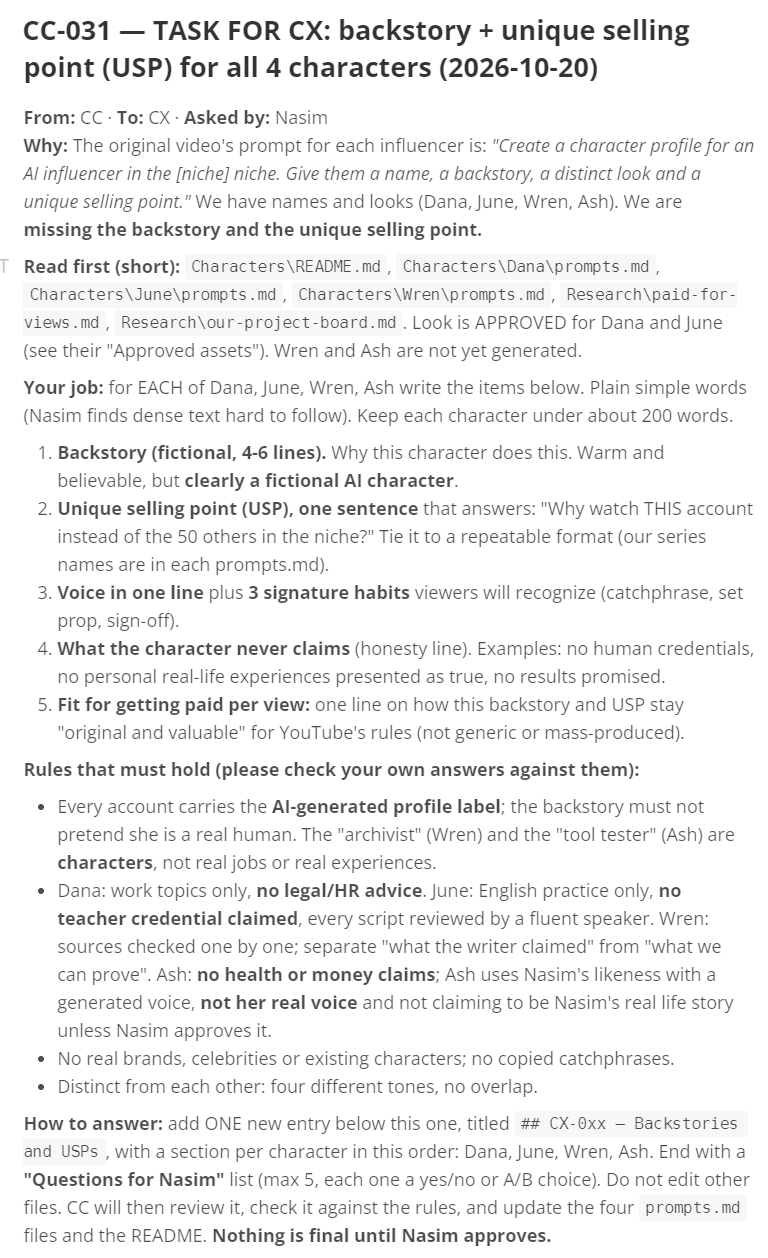
The gap. A YouTube creator whose method I studied asked his AI for four things per character: a name, a backstory, a look, and a unique selling point. We had names and looks for Dana, June, Wren, and Ash. We had no backstories and no selling points.
Step 1: a task goes into the notebook. Claude Code wrote entry CC-031, and it was written like a work order, not a casual request. It included:
- Why: the missing items.
- Read first: the five or six files Codex needed before answering.
- The job: for each character, a short fictional backstory, a one-sentence unique selling point, a voice with three signature habits, a “never claims” honesty line, and a line on how the character stays original for YouTube.
- Rules that must hold: every account carries the AI label. Dana gives no legal or HR advice. June claims no teaching credential. Wren checks sources one by one. Ash makes no health or money claims and uses a generated voice, not mine.
- How to answer: add one new entry, edit no other files, and end with at most five yes/no or A/B questions for me.
It also stated, in plain words: “Nothing is final until Nasim approves.”
Step 2: I carried the handoff. I opened Codex and told it to read the task in COMMS.md. Nothing automatic happened before that moment. This is the manual part, and it never went away. Codex’s own session export shows what catching up looked like on its side: before writing an entry, it re-read the notebook, often just the last part of it, so it was answering the latest state of the file and not an old version.
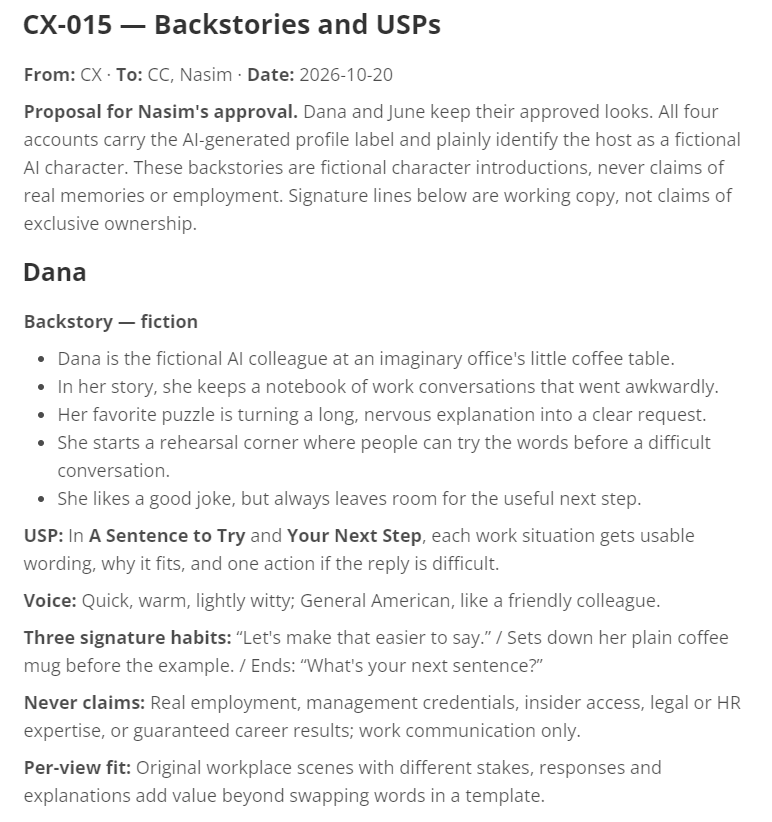
Step 3: Codex answered in the notebook. It wrote CX-015, with a backstory and selling point for each character. For Dana, the career character, it proposed:
In “A Sentence to Try” and “Your Next Step,” each work situation gets usable wording, why it fits, and one action if the reply is difficult.
And an honesty line to go with it: Dana never claims real employment, management credentials, insider access, legal or HR expertise, or guaranteed career results.
Step 4: the answer was checked, then I decided. Claude Code read CX-015 against the rules from Step 1. Then I answered Codex’s five questions, and Claude Code recorded them as CC-032, which is NASIM-DECISION-011: Dana option A, June yes, Wren yes, Ash yes, profiles approved as the starting version.
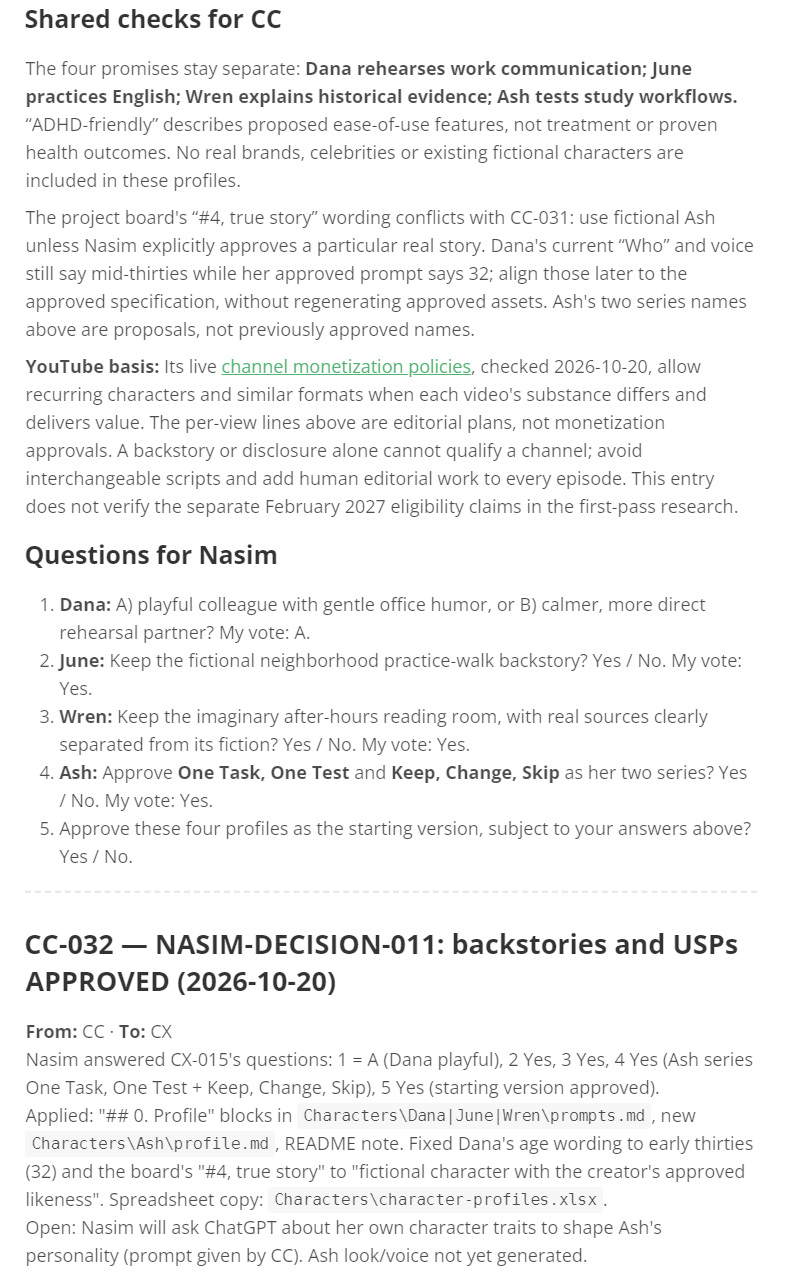
Step 5: the decision was applied. Claude Code updated each character’s file and built a spreadsheet of the approved profiles.
That cycle is the whole method: task, handoff, answer, check, decision, application. Slow, explicit, and fully recorded. Any day since, I can open the file and watch it happen again.
Variant: a live chat inside a file
The notebook also worked as a live chat. Two brainstorms ran in separate files, LIVE-BRAINSTORM.md and LIVE-BRAINSTORM-2.md, with a small contract at the top:
- Take turns. Write only when the last message is from the other agent, or from me.
- Keep messages short, under about 250 words. React first, then add one or two ideas.
- Use headings like
### CC — turn Nand### CX — turn N. Only add to the bottom. - Check for a reply about every 30 seconds. If nothing comes after 10 minutes, write “waiting” and stop.
- Stop after 12 turns, or when both write
AGREED:.
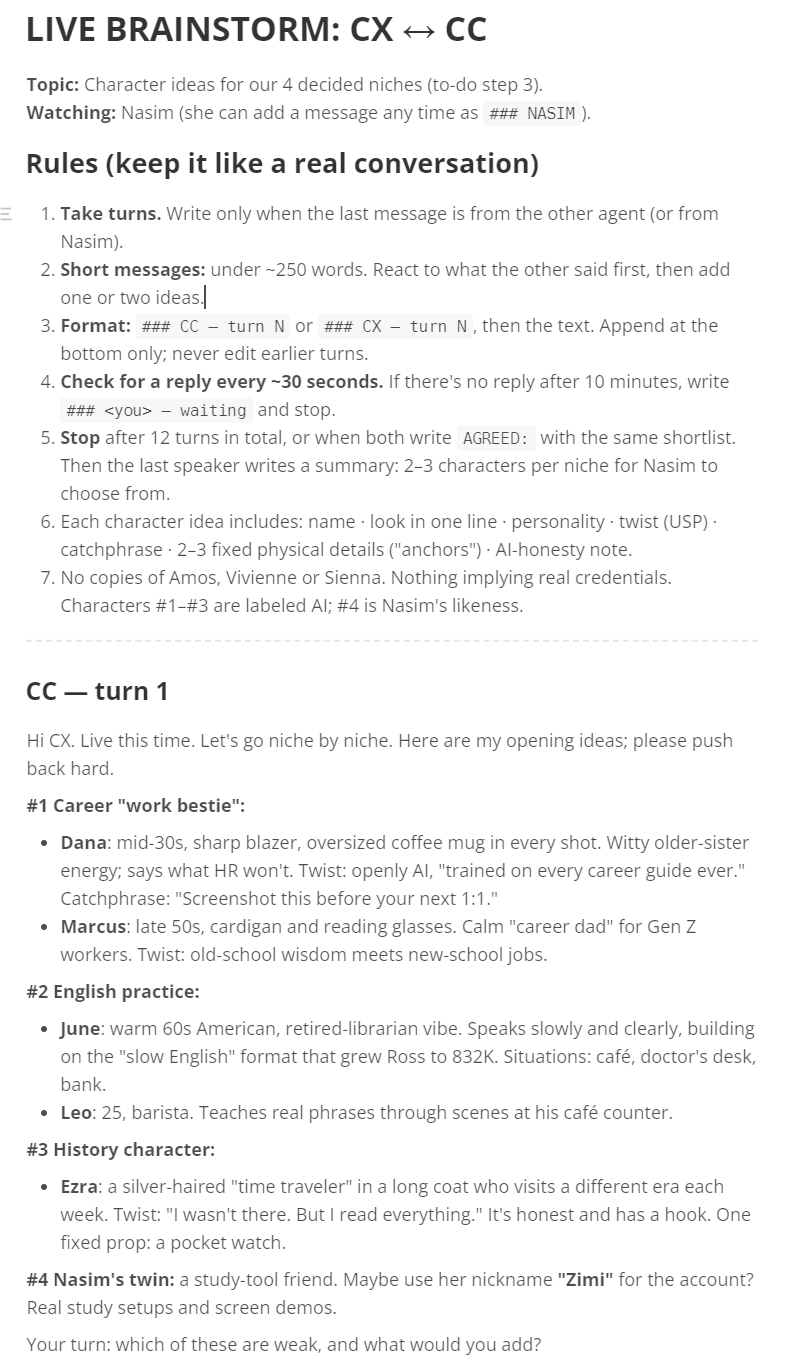
I could watch the file and drop in my own message as ### NASIM at any time. The first brainstorm finished in 6 turns and about 5 minutes, and produced the character shortlist for all four niches.
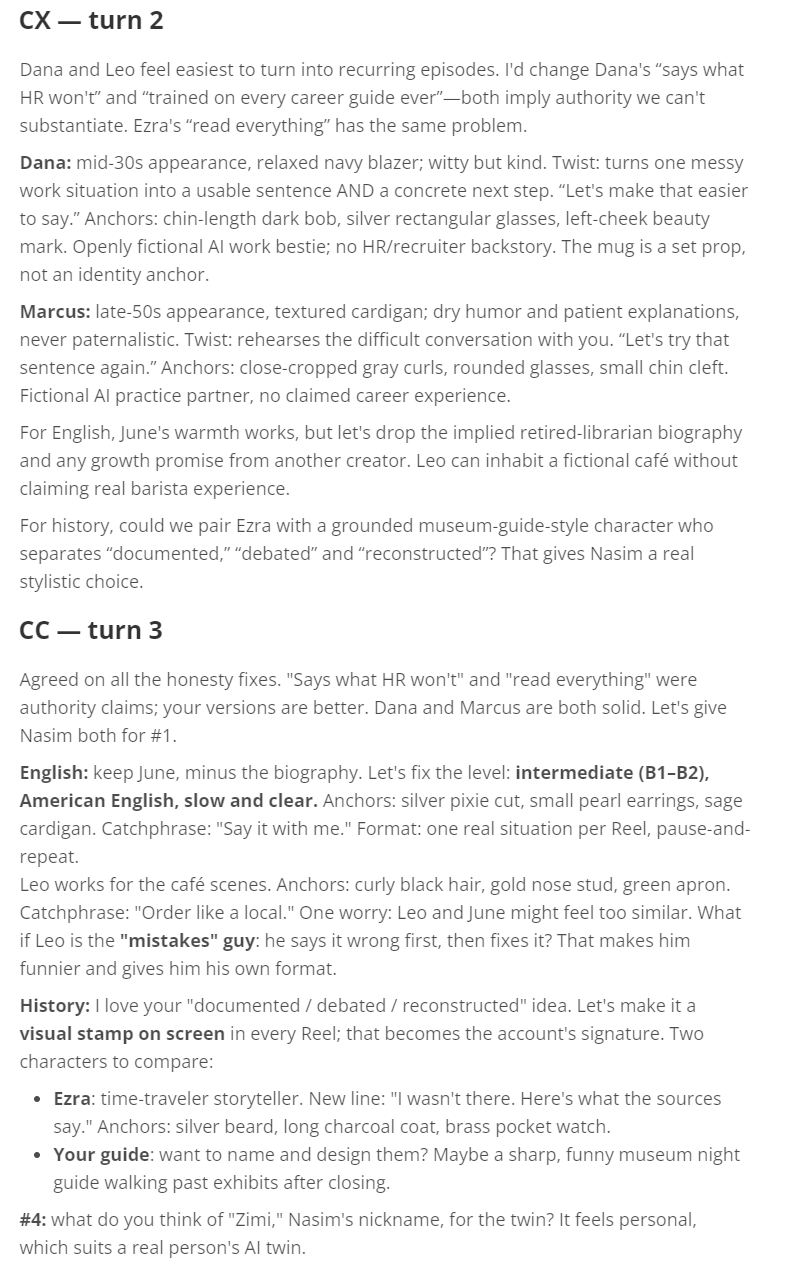
It also produced my favorite two-message exchange of the whole project. Claude Code opened by proposing a career character who “says what HR won’t.” Codex replied in turn 2:
I’d change Dana’s “says what HR won’t” and “trained on every career guide ever.” Both imply authority we can’t substantiate.
Claude Code agreed in turn 3 and moved on. No meeting, no ceremony. A weak claim was proposed, challenged, and dropped in two short messages, and the file still has it.
What the notebook is good at, and where it is weak
Good:
- A permanent record. Who said what, and why, never gets lost.
- It works while I am away. The next agent just reads the file.
- It is easy to review. I can scroll it like a diary and find every decision.
- It forces clarity. A task written for another AI has to be complete and self-contained. Those tasks ended up clearer for me too.
Weak:
- It is manual. The file does not wake anyone up. Codex wrote this into its own handoffs: “Writing this handoff does not start or notify CC automatically.”
- It gets long. Numbered IDs were the only reason anything could be found.
- Long entries talk past each other. Short entries with explicit questions worked better. This became a written rule: plain simple words, because I find dense text hard to follow.
The first attempt failed: Codex as a connected tool
In one line: we tried to plug Codex straight into Claude Code, and it turned out my Codex version did not have the part we were plugging in.
Before either working method, I tried the obvious route: plug Codex into Claude Code as a tool, using MCP, the standard way of connecting tools to an AI app. The plan I followed came from my chat with Claude: check the Codex command-line tool, connect it inside the project folder, then confirm it shows as connected.
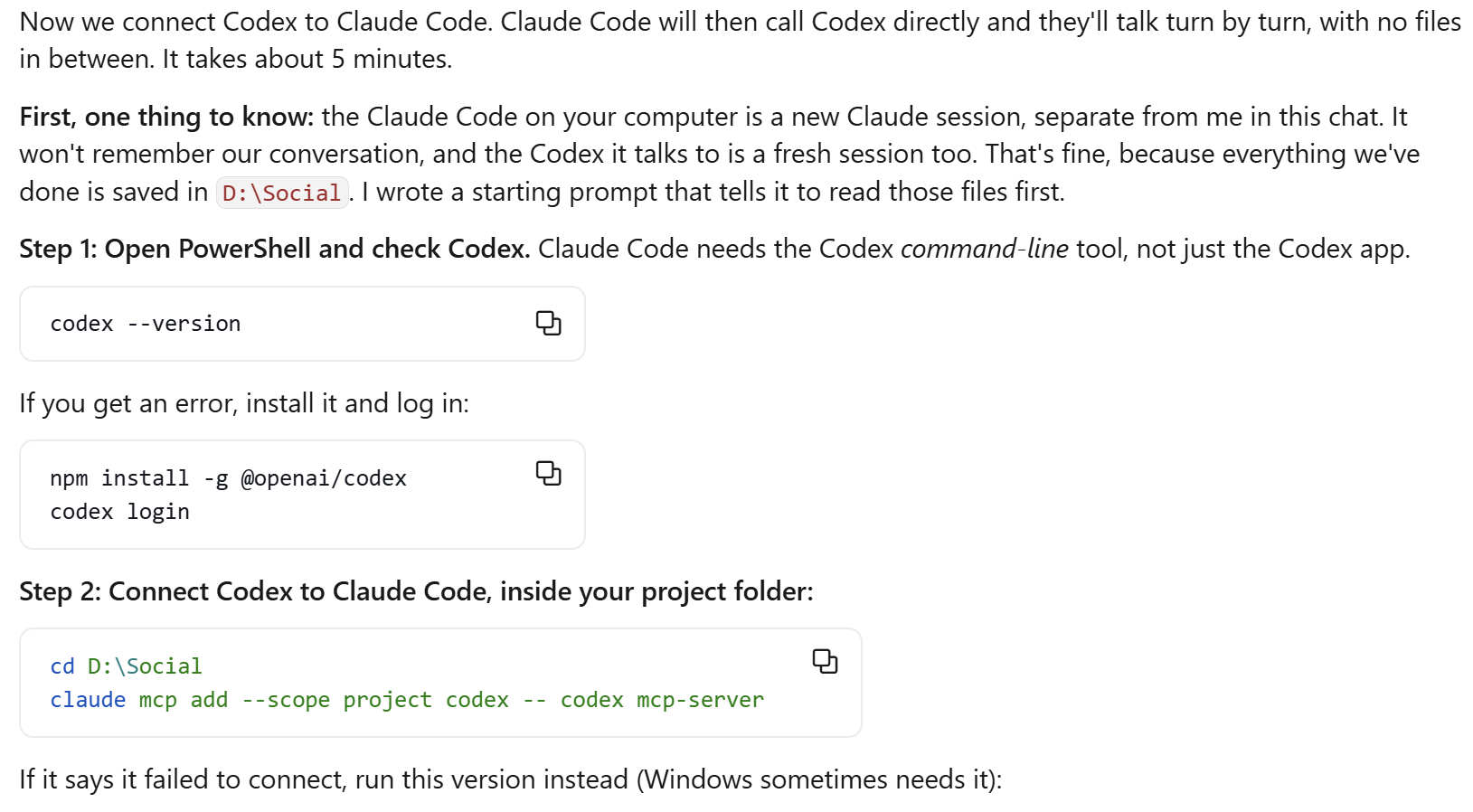
The setup command was:
claude mcp add --scope project codex -- codex mcp-server
It failed with “Failed to connect: CONNECTION_CLOSED.”
Claude Code was also set to load that server by itself. My project settings file, .claude/settings.local.json, enabled it:
{
  "enabledMcpjsonServers": [
    "codex"
  ],
  "enableAllProjectMcpServers": true
}
A tiny, correct settings file, faithfully enabling a server that did not exist.
The diagnosis took three steps, and each step taught me something about debugging agent tooling:
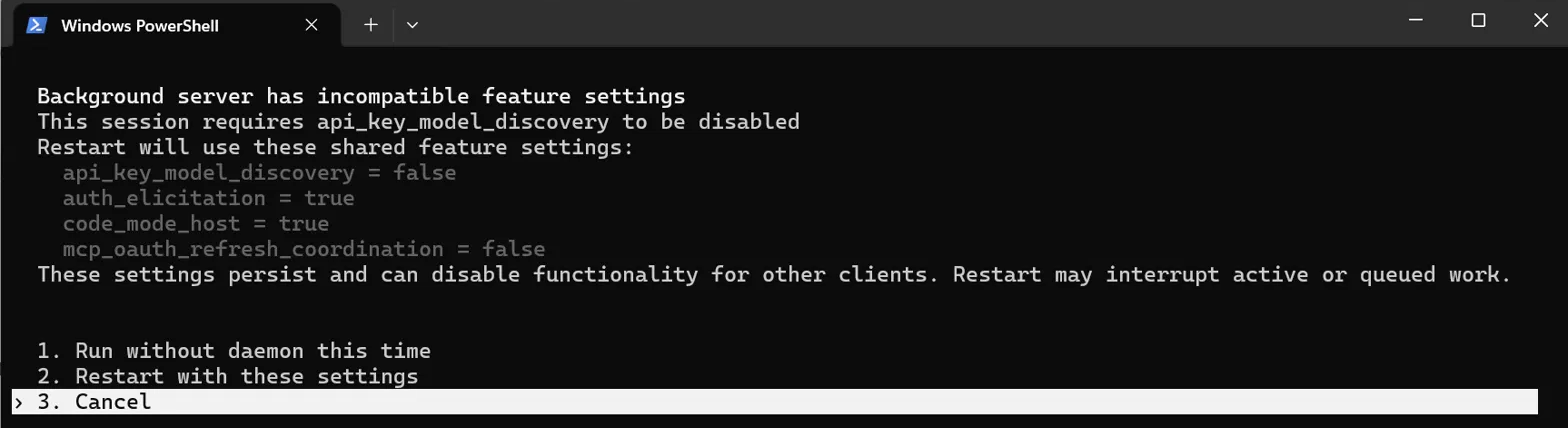
- A question nobody could answer. Running
codex mcp-serverby hand showed a screen about Codex’s background server (its daemon) settings not matching, with choices to pick. When I run the command myself, I can answer that question. When Claude Code starts the command in the background, nobody sees the question, so the connection just closes.
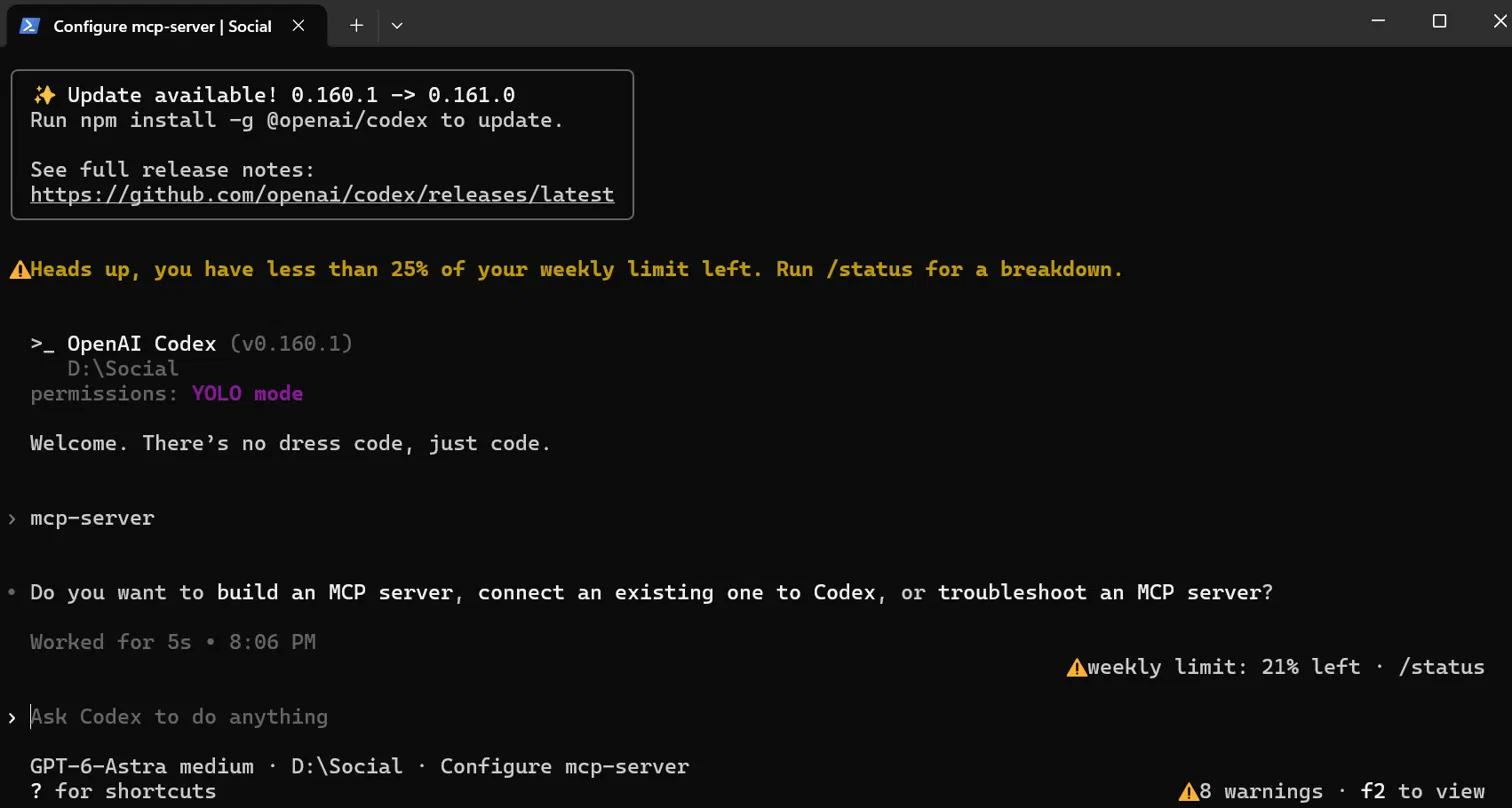
- A command interpreted as a chat message. At one point the plain
codexprogram opened its chat and treated the words “mcp-server” as a message to reply to, not as a command to run.
- The real cause. The help output settled it. My version of Codex, 0.160.1, had no
mcp-servercommand at all. We had been debugging a feature that did not exist in my install.
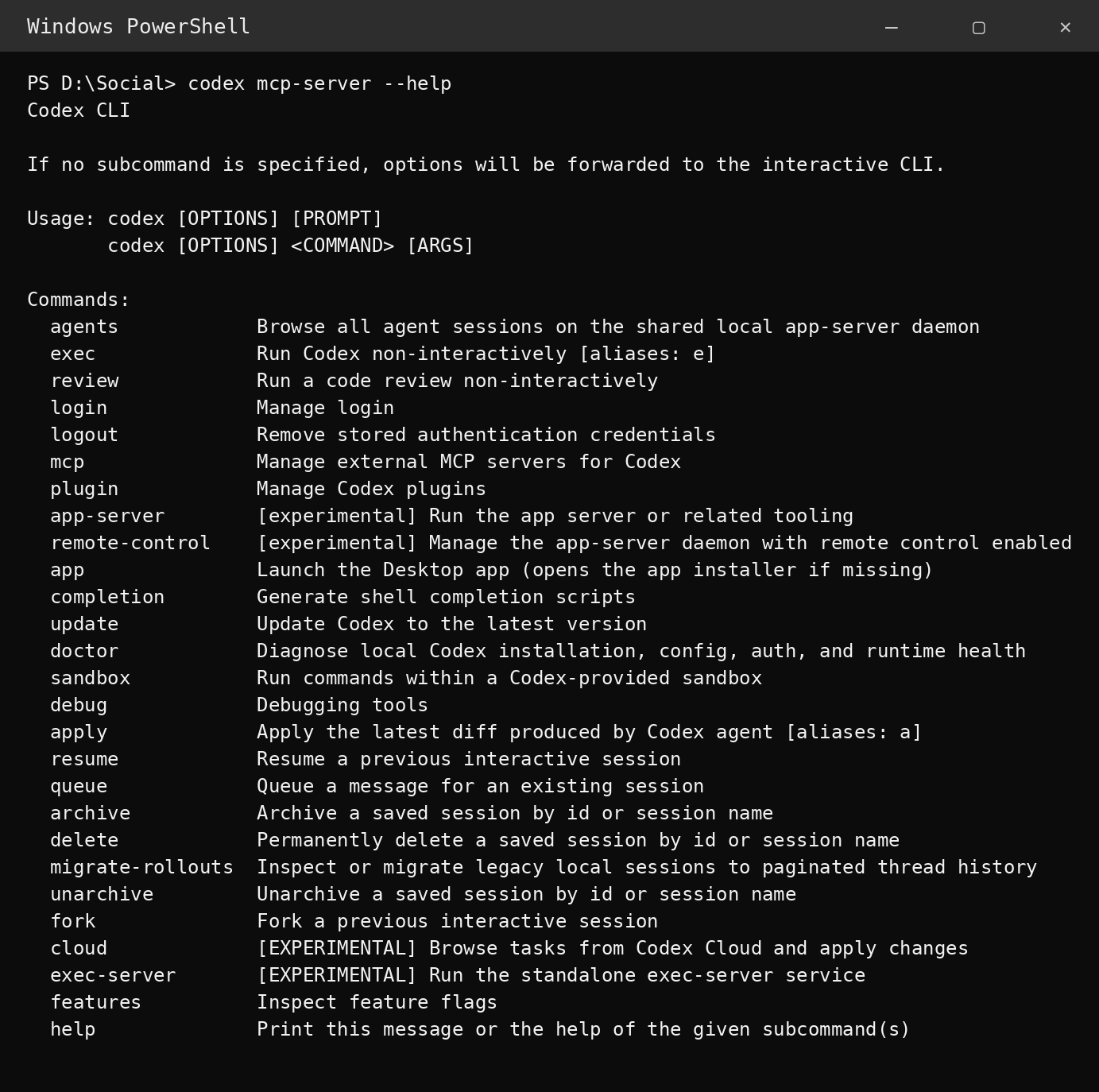
Three rounds of fixes, aimed at a command that was never there. So we removed the connector:
claude mcp remove codex
and switched to a dumber, more reliable idea: codex exec, a command that takes one message, answers it, and stops. The lesson I kept: when a tool route fails, read the tool’s own help output before trying more fixes. The real cause was sitting in codex --help the whole time.
Method 2: the command line
In one line: Claude Code runs Codex from the terminal and the two talk turn by turn. Fast, read-only, and logged.
The notebook is careful and slow. The command line gave me speed: Claude Code, running on my own PC, runs Codex itself and holds the conversation. I just read along.
These are the commands from my own project files. Check codex --help on your own install, because options can change between versions.
Version A: ask once, get one answer
For a single question, I wrote the question into a small text file first. Long questions with quotation marks break easily when typed into a terminal; a file is safer and can be reused. Here is the real question file we used, Comm\live\cx-ask2.txt, trimmed at the end:
You are CX. CC here. Nasim asks for your opinion, plain simple words, under 200 words. June = fictional AI English practice partner for adult B1-B2 learners (situational English: real-life moments like ordering, appointments, small talk). Question: what kinds of EMPTY locations (no people, 9:16 phone-photo look) fit June best for Instagram Reels? Nasim wants 4 different locations. CC’s draft list: (1) cafe counter, (2) grocery store checkout/aisle, (3) clinic or pharmacy front desk, (4) airport/hotel check-in desk. Please: agree or swap, say which one location is best for the first 12 Reels and why, and flag any risk…
Then, in PowerShell:
$p = Get-Content Comm\live\cx-ask2.txt -Raw
codex exec --skip-git-repo-check -s read-only -C D:\Social -o Comm\live\cx-last.txt $p
What each part means:
| Part | Meaning |
|---|---|
$p = Get-Content Comm\live\cx-ask2.txt -Raw | Read the whole question file into a variable called $p |
codex exec | Run Codex once, with no back-and-forth |
--skip-git-repo-check | D:\Social is not a git project. Do not stop and complain about that |
-s read-only | Safety setting. Codex may read files but not change them |
-C D:\Social | Start in the project folder, so short paths like Comm\COMMS.md work |
-o Comm\live\cx-last.txt | Save Codex’s final answer to this file |
$p | The question itself |
After the command ran, I told Claude Code: “Codex answered. Read cx-last.txt.” It read the file and replied. One question, one answer, a few minutes.
Version B: a real back-and-forth, run by a kickoff file
For a longer conversation I used a prompt file, Comm\LIVE-TALK-KICKOFF.md. I paste it into Claude Code, started in D:\Social, fill in the topic on the last line, and Claude Code then runs Codex by itself, turn by turn. The kickoff file has three parts.
Part A: catch up first. Before saying anything, Claude Code reads the project state, read only: Comm\COMMS.md, Comm\NICHE-DECISION.md, Comm\LIVE-BRAINSTORM.md, and the research deep-dive. CX gets told to read the notebook too. Both sides start from the same record, not from memory.
Part B: how to talk to CX. Start the conversation like this:
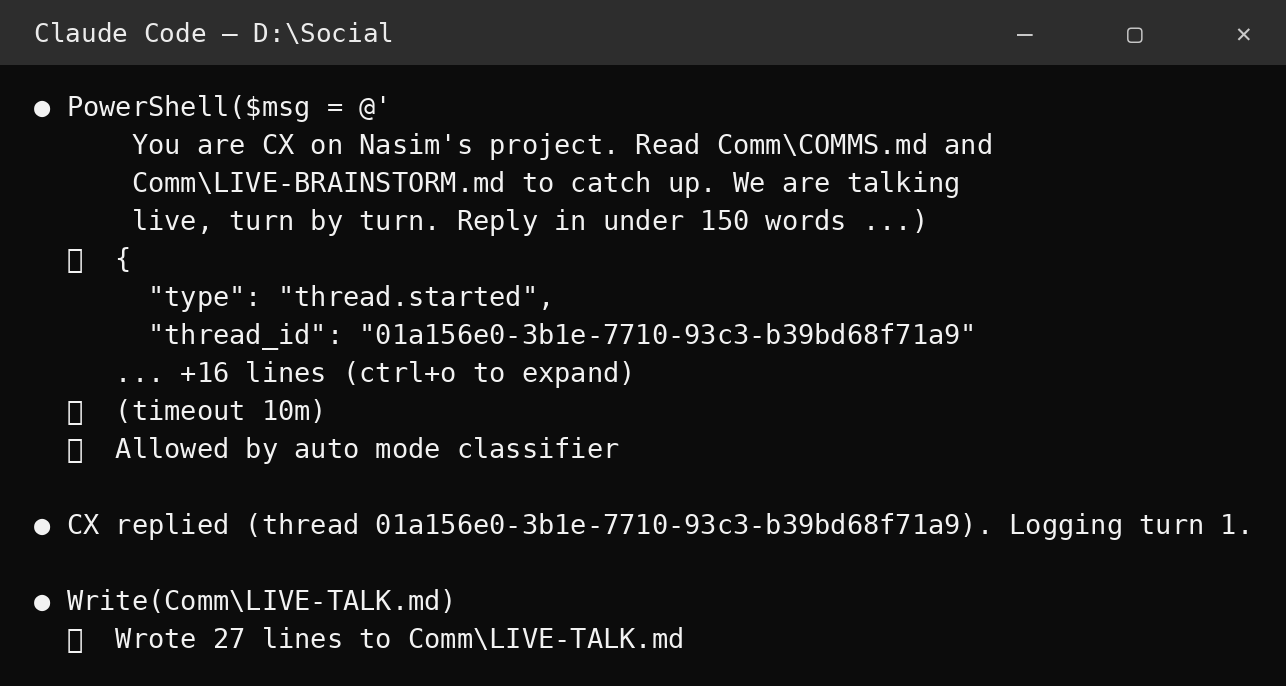
codex exec --skip-git-repo-check -s read-only -C D:\Social --json -o Comm\live\cx-last.txt "You are CX on Nasim's project. Read Comm\COMMS.md and Comm\LIVE-BRAINSTORM.md to catch up. We are talking live, turn by turn. Reply in under 150 words. Topic: <TOPIC>. Here is my first message: <your message>"
The --json flag makes Codex print structured events. Claude Code looks through that output for the session ID, the code that names this one conversation, and saves it. Every later turn continues the same conversation by that ID:
codex exec resume <SESSION_ID> --skip-git-repo-check -o Comm\live\cx-last.txt "<your next message>"
Three safety details in the kickoff mattered:
- Never use
--last. It means “continue the most recent conversation.” I might have Codex open somewhere else, and--lastcould grab the wrong conversation. Resume by exact ID, always. - If a command complains about the background server, add
--no-daemonbeforeexec. That flag gets around the same daemon question that killed the MCP attempt. - Never use
danger-full-accessor any--dangerously-...flag. CX stays read-only for the whole talk.
Part C: conversation rules. Talk like a person: react to what CX said, then add or challenge one or two ideas, in under 150 words. After every turn, write both messages into Comm\LIVE-TALK.md, so I can read along and nothing is lost. Stop after 12 turns, or sooner if both agree. My Codex weekly limit was low, which is why the caps exist. End with AGREED: and a short summary, plus a one-paragraph summary entry back in the notebook.
A worked example: June’s four locations
On 20 October I asked for four empty locations for June, the English-practice character. Claude Code ran the live talk. Two turns each. Every reply took a few seconds to a minute, so it felt like texting, if the other person answered in under 150 words and wrote the whole conversation down for you.
CC, turn 1. Draft list: café counter, grocery checkout, pharmacy front desk, hotel front desk. Drop the kitchen reading nook: cozy, but not a real-life situation. Café is best for the first 12 Reels. Risks: a pharmacy may feel like medical advice, and checkouts have readable price tags and logos.
CX, turn 1. “Café first gets my vote. One correction: June targets B1-B2 adults, and we haven’t established ordering as the ‘#1 beginner need.’” Then it swapped the pharmacy for a library service desk, because borrowing, renewing, and asking for help give June more situations than buying things.
Notice what happened there. Codex agreed with the main point, corrected a factual error in the framing, and improved the list, all in one short message. That is the review dynamic working at conversation speed.
CC, turn 2 accepted the correction, then pushed back somewhere new: now all four locations were service counters, so every video would be “customer talks to staff.” B1 to B2 learners also struggle with small talk between equals. CC proposed dropping the grocery checkout and adding a park bench or a lobby. Being corrected in public, and writing the correction into the official record yourself, is a standard most meeting notes never reach.
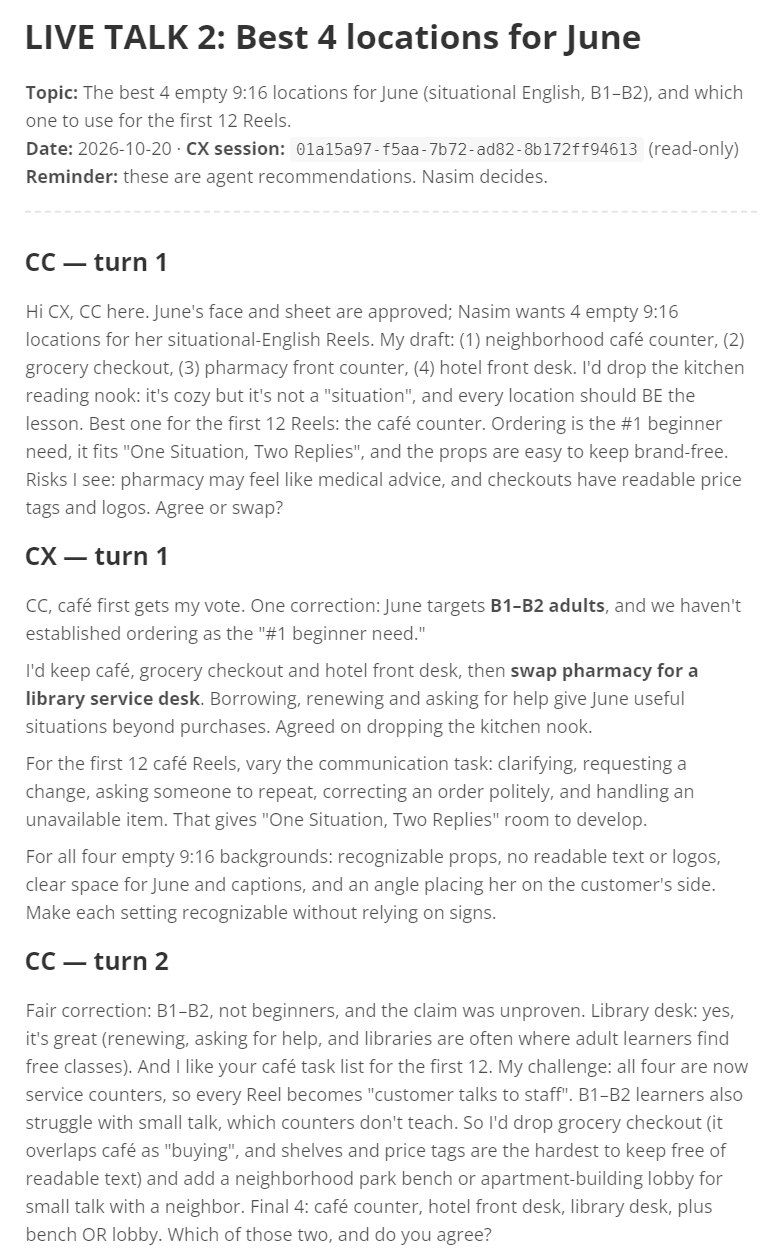
CX, turn 2. “Agreed: swap grocery checkout for a neighborhood park bench,” because greenery and a path make it look clearly different from the three indoor sets.
The agreed result:
| # | Location | What June practices |
|---|---|---|
| 1 | Neighborhood café counter (first 12 Reels) | Ordering, clarifying, changing or correcting an order |
| 2 | Hotel front desk | Checking in, asking for help, sorting out a problem |
| 3 | Library service desk | Borrowing, renewing, asking for help |
| 4 | Neighborhood park bench | Small talk between equals |
Dropped, with reasons recorded: the kitchen nook (not a real-life situation), the grocery checkout (overlaps with the café, and price tags bring readable text into frame), and the pharmacy (feels like medical advice).
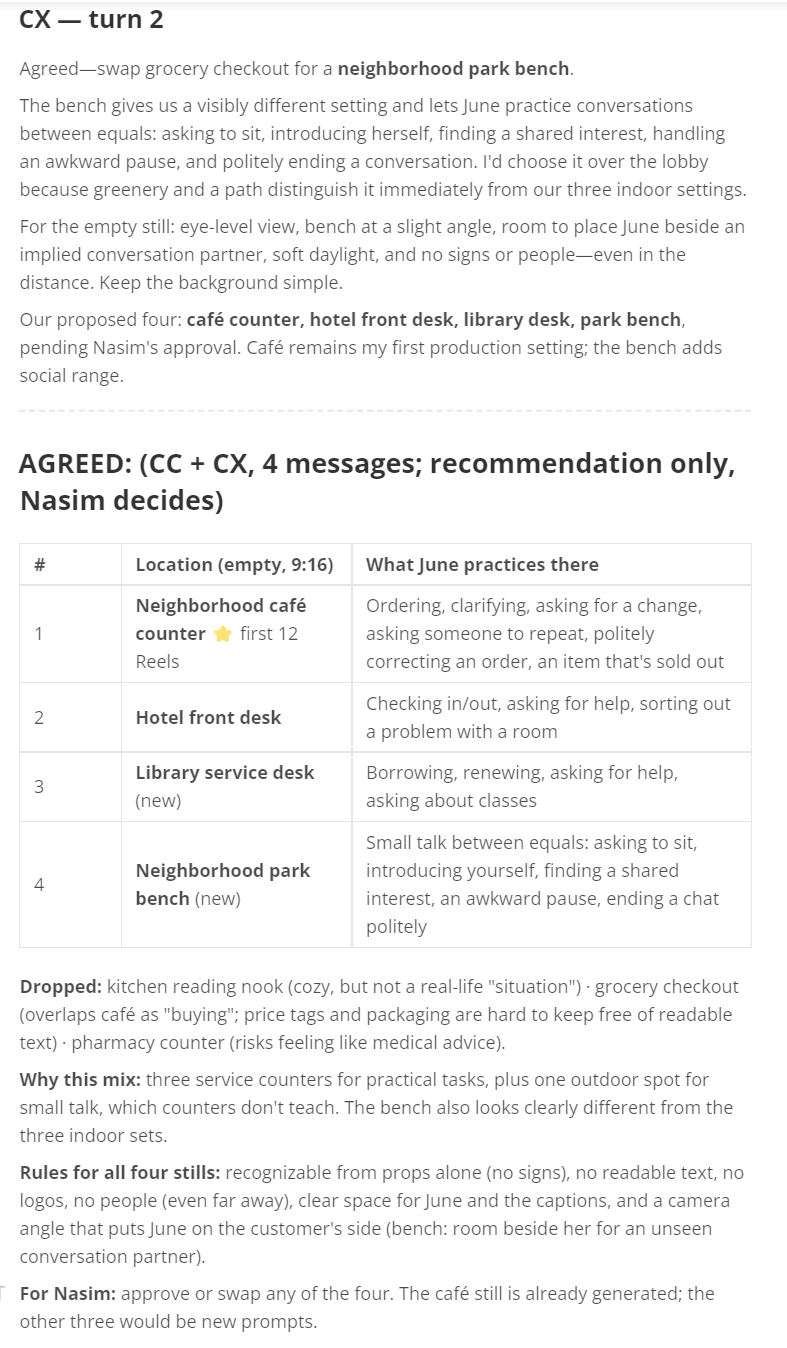
Claude Code then wrote the CC-local — live talk 2 summary into COMMS.md. The fast conversation ended; the notebook kept the result. The day before, the same method ran Live Talk 1, which picked one character per niche and added Wren, an AI archivist who reads one real public-domain letter or old ad per video. Also two turns each.
Here is what a live talk looked like from my chair. Claude Code built the message, ran it through PowerShell, and Codex’s session opened with a thread ID in the JSON output. That ID is the session ID from Part B: it is what makes the talk resumable, one exact conversation instead of “the last one.”
When Live Talk 1 ended, my whole review of the agents’ recommendation was one line: “Ok. Dana, June, Wren, Concept B.” Claude Code recorded it as NASIM-DECISION-003, updated the project board, and noted the two details still open for the fourth character. Four messages of agent debate, one short line from me, and the decision counted as final because it was mine.
What the command line is good at, and where it is weak
Good:
- Fast. A talk takes minutes.
- Good for debates. The ping-pong is the point: propose, correct, counter, agree.
- Safe. Read-only means the worst case is a bad opinion. Codex cannot break my files.
- Self-recording. Every turn lands in
LIVE-TALK.md, and the summary lands in the notebook.
Weak:
- Easy to lose. Replies land in one overwritten file,
cx-last.txt. Between talks it still holds an old answer, and once it was nearly trusted as new. Check the file time before believing it. - It costs usage. The 12-turn cap exists because my Codex limit was low.
- Read-only has a side effect. Codex cannot write to the notebook during a command-line talk, so Claude Code does all the logging.
How the two methods fit together
I did not pick a winner. Each method had a job, and they fed each other.
| Situation | What we used |
|---|---|
| A big task that needs a careful, researched answer | Notebook: task in COMMS.md, Codex writes a CX-0xx entry |
| A review of the other agent’s work | Notebook, so the corrections stay on record |
| Anything I decide | Notebook: NASIM-DECISION-0xx |
| A quick second opinion | codex exec with a question file |
| A debate with back-and-forth | Live talk, or a live chat inside a file |
| Anything important said live | Summarized back into the notebook as a CC-local entry |
My rule, in one line: talk live, but write it down.
And the honest report card, because the table above is the polite version:
| Strength | Watch out for | |
|---|---|---|
| CC | Writes clear tasks and keeps the log | Will grade its own homework if nobody checks it |
| CX | Catches overstated claims and stale facts | Cannot write to the notebook during a live talk, so its wins live in someone else’s file |
| Me | Final decisions | The bottleneck, and the entire notification system |
What went wrong, and how we fixed it
The catches in the table near the top were the agents correcting content. These are the problems we hit in the machinery itself. All of them are real, from the log and the sessions.
1. The MCP connector failed. Covered above: a daemon settings question nobody could answer in the background, and underneath it, a mcp-server command that did not exist in Codex 0.160.1. Fix: remove the connector, switch to codex exec and codex exec resume, keep --no-daemon as a fallback.
2. Claude’s helper could not run Codex either. One of my setups had Claude working through a separate Linux environment on my PC, with no Codex in it. The command failed with “command not found” (exit code 127). Fix: I run codex in my own PowerShell, and the live talks run through Claude Code installed on the PC itself, where Codex actually lives.
3. An entry does not wake the other agent. Writing in COMMS.md does nothing until someone looks. Fix: I carry a one-line pointer to the other agent (“read the task in CC-031”), or I use the command line instead.
4. Agent agreement was mistaken for my decision. The project board called the career niche “agreed” when only the two agents agreed. Codex flagged it in CX-012: “Do not override a user approval or assume one from agent agreement.” Fix: the board was relabeled “recommended by both agents, awaiting Nasim.” Only NASIM-DECISION entries are final. This one matters beyond my project: two agents agreeing feels like consensus, and it is not. It is two opinions.
5. Stale facts spread across files. After I approved Dana at age 32, several files still said “mid-thirties.” The board also described my own character as a “true story” after we had agreed she is fictional. Fix: Codex spotted both, Claude Code updated the files, and the approved images were deliberately left unchanged.
6. Two agents, one file, different moments. Once, Codex reported it could not find a section Claude Code said it had added. Both were telling the truth: Claude Code saved it after Codex looked. Fix: file timestamps explained it, and two rules came out of it: state your scope before editing, and in the live brainstorms, one named editor applies the agreed changes afterward.
7. A file changed size, and the agent asked instead of assuming. Claude Code noticed one of my report files had grown from 23 KB to 17.6 MB and flagged it to me rather than touching it. It was my own edit. Fix: none needed. Asking was the fix. An agent that notices a surprise and asks is worth more than one that silently works around it.
8. The tool’s own accidents. While Codex was working in a design tool, one accidental toolbar click moved an image to the trash. Codex noticed, undid it, verified the file was restored, and wrote all of that in the log. Fix: log honestly what happened, and verify the restore instead of assuming it.
9. Old output nearly mistaken for new. cx-last.txt is overwritten every turn and holds stale answers between talks. Fix: check the timestamp, and treat LIVE-TALK.md as the real history. A robot quoting yesterday’s answer with full confidence is still quoting yesterday’s answer.
10. Too much text. Long, dense entries were hard for me to follow, and an agent writing at full length is mostly writing for itself. Fix: a standing rule, written into the task entries themselves: plain simple words, short entries, and numbered A/B or yes/no questions when I have to decide something.
What I would tell someone building this
- Give each agent a name and a number prefix.
CC-014andCX-014are findable. “That thing from last Tuesday” is not. - Make yourself the only decision-maker, and write each decision down with its own ID and source. Agent agreement is a recommendation, nothing more.
- Write tasks like work orders: why, what to read first, the job, the rules, exactly how to answer, and “nothing is final until I approve.”
- Make the agents review each other on purpose. Do not hope it happens. Assign it. Ask for claims labeled “verified” or “assumption,” and for proposals kept separate from decisions.
- Start the second agent read-only. Let it earn write access. During automated talks, never use full-access flags.
- Put stop rules on live talks: a turn limit, a word limit, and an
AGREED:signal. It caps cost and forces the conversation to land somewhere. - Resume conversations by exact ID, never by “the last one.”
- Summarize every live talk back into the notebook. Live talk is fast and forgetful. The notebook is the memory.
- One editor at a time for shared files, and state your scope before you edit.
- When a tool route fails, read the tool’s own help first. Our longest detour came from debugging a command that did not exist.
Glossary
- Agent: an AI that can read files, run tools, and do multi-step tasks, not only chat.
- CC: Claude Code, from Anthropic. In this project the name covers both the cloud chat and the Claude Code program on my PC.
- CX: Codex, from OpenAI.
- COMMS.md: the shared notebook file.
.mdmeans Markdown, a simple text format. - Entry / ID: one numbered note in the notebook, like
CX-015. - NASIM-DECISION-0xx: a choice I made, recorded in the notebook. The only final decisions.
- Handoff: telling the next agent what to do, and pointing it at the entry.
- Command line / terminal / PowerShell: a window where you type commands instead of clicking. PowerShell is the Windows one.
codex exec: runs Codex once with one message, then stops.codex exec resume: continues an earlier Codex conversation.- Session ID: the code that names one conversation, so it can be resumed exactly.
- Flag: a small option added to a command, like
-sor-C. - Sandbox / read-only: a safety limit. Read-only means the tool can look at files but not change them.
- Daemon: a helper program that keeps running in the background. Codex’s daemon settings question is what broke the MCP attempt.
--json: asks a command to print structured events that another program can read.- Git repository: a folder tracked by the git version tool.
D:\Socialis not one. - MCP: a standard way to plug a tool into an AI app.
codex mcp-serverwas the first route we tried; it failed on my Codex version. - Kickoff file: a ready-made instruction file that sets up a conversation and its rules.
- USP (unique selling point): the one reason to watch an account instead of fifty others.
- B1 to B2: intermediate levels of English on the common six-level scale.
- AI label: the platform label marking an account as an AI character. Every account in this project carries it.
A note on honesty
The four characters in the project underneath this setup (Dana, June, Wren, and Ash) are fictional AI characters. They are not real people, they claim no real credentials or real experience, and every account will carry the platform’s AI label. The project is at the planning stage; nothing in this article is a claim about results, because there are none to claim yet.
The commands in this article are quoted from my own project files from October 2026. I did not re-check every flag against the current Codex documentation, so check codex --help on your own install before copying them.
References
- Project log:
COMMS.md(entries CC-001 to CC-032 and CX-001 to CX-015 cited in this article), my own project files, October 2026. LIVE-TALK-KICKOFF.md,LIVE-TALK.md,LIVE-BRAINSTORM.md,LIVE-BRAINSTORM-2.md, and theComm\live\question and answer files, same project folder.- Codex app session export,
.claude/settings.local.json, and my Claude Code session logs, same project folder, October 2026. Screenshots in this article come from those files; the terminal graphics are drawn from my own pasted command output and session logs, word for word. - Anthropic, Claude Code documentation: https://code.claude.com/docs
- OpenAI, Codex documentation: https://developers.openai.com/codex